

Summary
In today’s fast-paced digital world, slow-loading images can silently kill your website’s performance, user experience, and SEO rankings. Understanding how CDN improves image delivery is one of the most powerful steps a website owner, developer, or digital marketer can take toward achieving a faster, more reliable web presence. A Content Delivery Network (CDN) distributes your images across multiple geographically dispersed servers, ensuring that every user — regardless of location — receives your visual content from the nearest possible point. This drastically reduces latency, cuts down page load time, and boosts Core Web Vitals scores. Whether you manage a high-traffic eCommerce store, a photography portfolio, or a content-heavy blog, CDN-based image delivery is no longer optional — it’s essential.
Table of Contents
- What Is a CDN and How Does It Work?
- How CDN Improves Image Delivery — The Core Mechanism
- Key Benefits of Using a CDN for Image Optimization
- How CDN Improves Image Delivery Through Format Conversion and Compression
- CDN and Responsive Images: Serving the Right Size Every Time
- Impact on SEO and Core Web Vitals
- Edge Caching Explained: Why It Matters for Images
- How to Choose the Right CDN for Image Delivery
- Best Practices for Maximizing CDN Image Performance
- Conclusion
- FAQs
1. What Is a CDN and How Does It Work?
A Content Delivery Network (CDN) is a globally distributed network of proxy servers and data centers strategically positioned across multiple geographic locations. Its primary function is to deliver web content — including HTML pages, JavaScript files, stylesheets, and most importantly, images — to users based on their geographic proximity to the nearest server node, also called a Point of Presence (PoP).
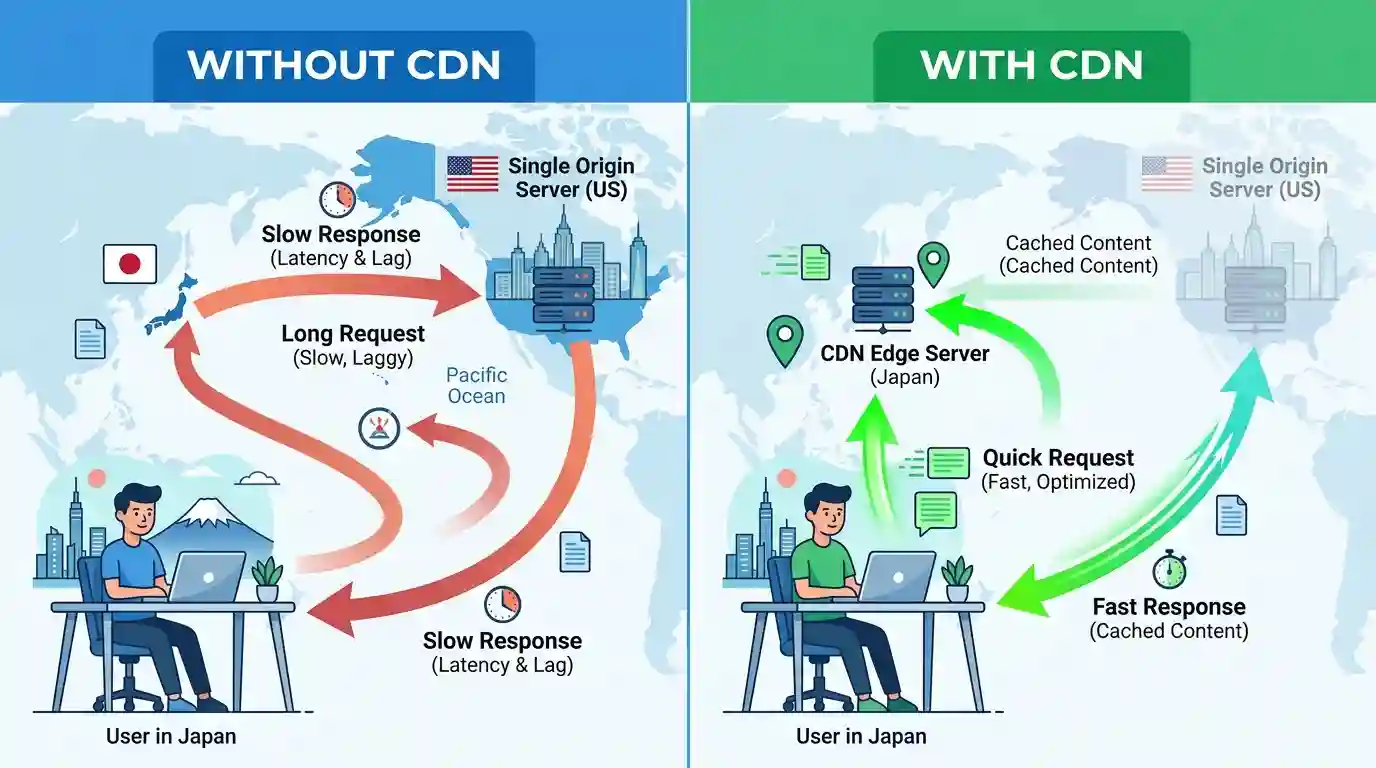
When a user visits your website without a CDN, every request for an image travels all the way back to your origin server, which might be located thousands of miles away. This long journey introduces latency, which translates into painfully slow image load times.
With a CDN in place, a cached copy of your image is stored on edge servers around the world. A user in Karachi, Tokyo, or Toronto all receive your images from a nearby PoP rather than from a single distant server. The result is dramatically faster delivery, reduced bandwidth consumption on the origin server, and a far smoother user experience.
2. How CDN Improves Image Delivery — The Core Mechanism
The mechanism behind how a CDN improves image delivery goes far beyond simple caching. It is a multi-layered system that combines smart routing, geographic distribution, protocol optimization, and real-time performance monitoring.
Here’s what happens under the hood when a user requests an image on a CDN-powered website:
Step 1 — DNS Resolution: The user’s browser sends a DNS query. The CDN’s intelligent DNS routing system resolves the request and directs it to the nearest edge server.
Step 2 — Cache Check: The edge server checks whether a cached version of the requested image exists. If it does (a “cache hit”), it serves the image immediately.
Step 3 — Cache Miss Handling: If the image isn’t cached (a “cache miss”), the edge server fetches it from the origin server, caches it locally, and then serves it to the user. All future requests for the same image from that region are served instantly.
Step 4 — Protocol Delivery: Modern CDNs use advanced protocols like HTTP/2 and HTTP/3 (QUIC) to deliver images with multiplexing and reduced connection overhead, further accelerating delivery speed.
Step 5 — TTL Management: Each cached image has a Time-To-Live (TTL) setting that controls how long it stays cached. When your image is updated on the origin server, the CDN can purge and refresh cache across all PoPs automatically.
This seamless pipeline is the foundation of how CDN improves image delivery for millions of users simultaneously, with near-zero additional load on your origin infrastructure.
3. Key Benefits of Using a CDN for Image Delivery
3.1 Reduced Latency and Faster Load Times
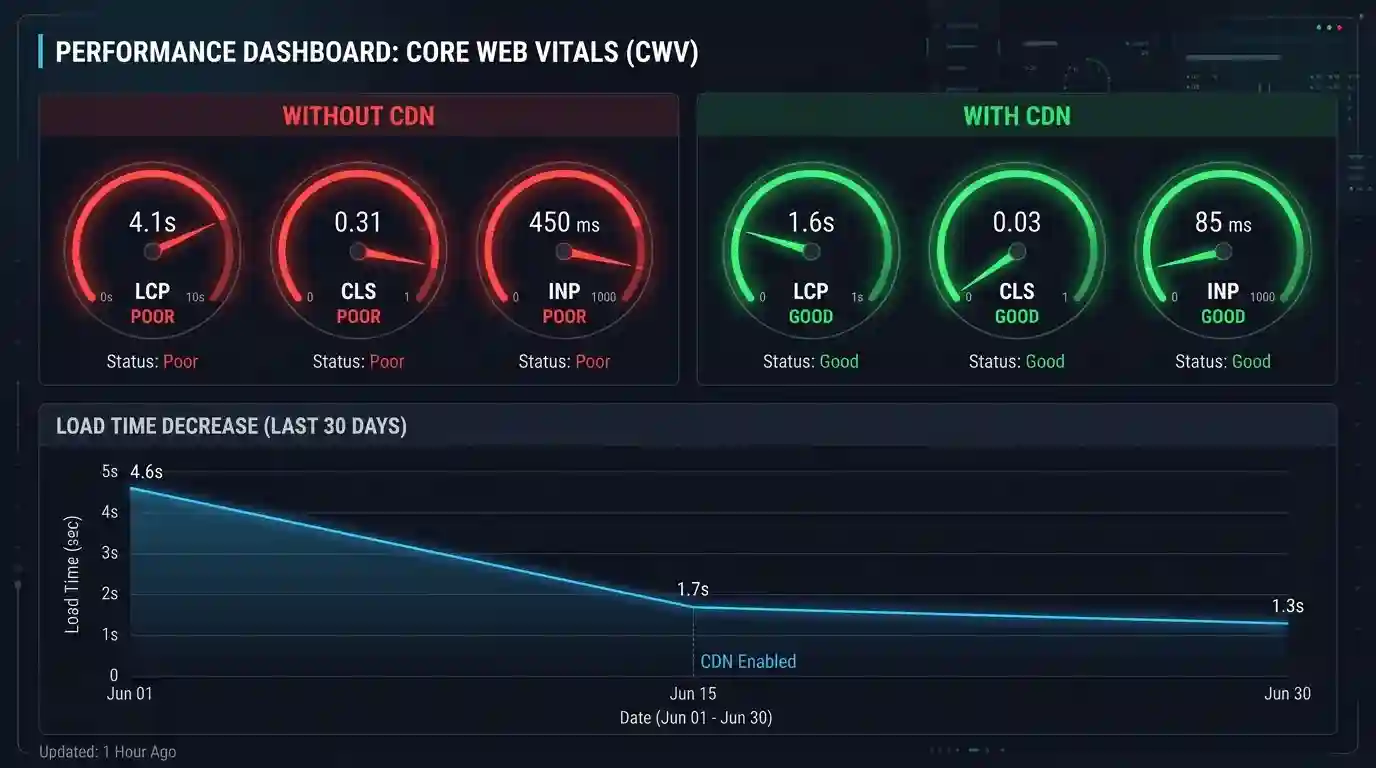
Latency — the delay between a request and a response — is the number one enemy of image delivery. By serving images from edge servers close to the end user, CDNs can reduce latency by 50–80% compared to serving from a single origin server. A page that loaded in 4 seconds might load in under 1 second with CDN-accelerated image delivery.
3.2 Improved Scalability and Traffic Handling
Traffic spikes — from viral content, product launches, or seasonal sales — can crash an origin server trying to serve thousands of image requests per second. A CDN absorbs these traffic surges across its distributed network, ensuring consistent uptime and image availability even during peak load.
3.3 Lower Bandwidth Costs
When images are served from CDN edge servers, they don’t consume bandwidth from your origin server. Most CDNs offer significantly lower bandwidth rates than traditional hosting providers, which means serving millions of images a month becomes cost-effective.
3.4 Enhanced Security and DDoS Protection
Leading CDN providers offer built-in DDoS mitigation, SSL/TLS encryption, and token-based image URL authentication. This protects your image assets from hotlinking, unauthorized use, and volumetric attacks that could bring your media delivery to a halt.
3.5 Better Availability and Redundancy
If your origin server goes down, a CDN can continue serving cached images, providing a buffer of availability. This fault-tolerant architecture ensures your users always see your content, even during infrastructure incidents.
4. How CDN Improves Image Delivery Through Format Conversion and Compression
One of the most transformative — and often underappreciated — capabilities of modern CDNs is on-the-fly image optimization. This includes automatic format conversion, adaptive compression, and real-time resizing — all applied at the edge server before the image reaches the user’s browser.
4.1 Automatic Format Conversion
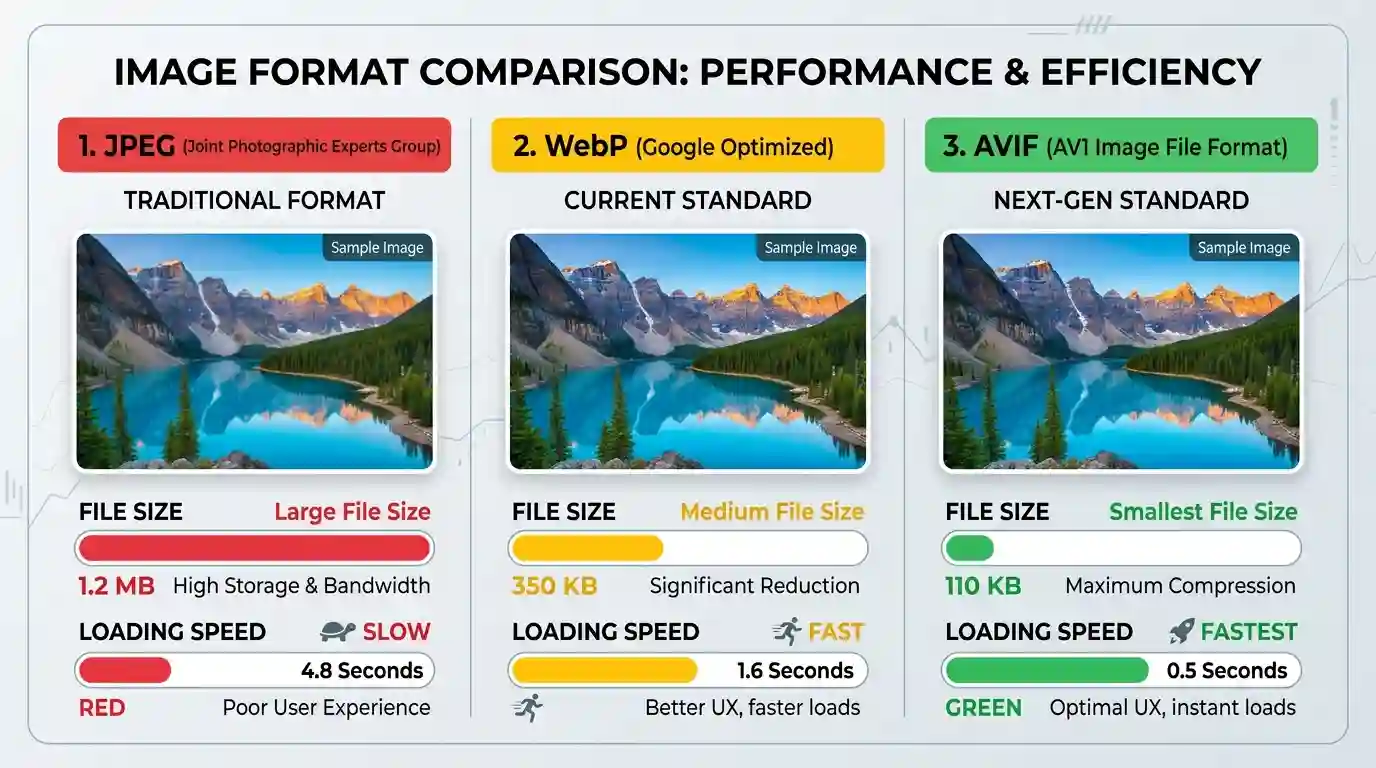
Older image formats like JPEG and PNG, while widely supported, are far larger than next-generation formats. CDNs like Cloudflare Images, AWS CloudFront, and Akamai can automatically convert images to:
- WebP — 25–35% smaller than JPEG at equivalent quality
- AVIF — up to 50% smaller than JPEG, the gold standard for modern browsers
- JPEG XL — emerging format with excellent compression ratios
The CDN detects the browser’s Accept header and delivers the most optimized format that the browser supports — without any manual conversion on your part.
If you want to manually convert your image formats, our Convert JPG to PNG Free Tool makes format conversion instant and hassle-free.
4.2 Lossy and Lossless Compression at the Edge
CDNs apply lossy compression (reducing file size by discarding some data) or lossless compression (reducing size without quality loss) depending on the image type and configuration. This can reduce image payload by 30–70% without any visible degradation in visual quality.
Before uploading to your CDN, it’s smart to pre-optimize your images. Learn how in our guide on How to Batch Compress Images to prepare your media library for maximum CDN efficiency.
4.3 Image Resizing and Cropping on Demand
Modern CDNs support URL-based image transformations. By appending parameters like ?width=800&height=600&fit=crop to an image URL, you can serve perfectly sized images to each device type — no server-side scripting required. This eliminates the need to store dozens of image variants in your CMS.
5. CDN and Responsive Images: Serving the Right Size Every Time
Responsive web design demands that images adapt to the screen size of the requesting device. Sending a 4000px wide image to a mobile user with a 390px screen is wasteful, slow, and costly in terms of mobile data consumption.
A CDN solves this elegantly through Device-Aware Image Delivery (DAID) and support for the HTML srcset and sizes attributes. When combined with CDN-level resizing, your website can:
- Serve a 320px thumbnail to a low-resolution mobile device
- Deliver a 1280px image to a tablet
- Push a 2560px retina image to a high-resolution desktop monitor
The CDN processes these requests dynamically, caches each resized variant at the edge, and ensures repeat visitors receive their appropriately sized image with zero additional processing overhead.
This responsive delivery approach can reduce mobile image payload by 60–80%, dramatically improving Largest Contentful Paint (LCP) — a critical Core Web Vitals metric that Google uses directly in its search ranking algorithm.
6. Impact on SEO and Core Web Vitals
Page speed is a confirmed Google ranking factor, and image delivery is one of the largest contributors to slow page load times. Here’s how CDN-powered image delivery directly improves your SEO performance:
6.1 Largest Contentful Paint (LCP)
LCP measures how long it takes for the largest visible element on a page — which is almost always a hero image or banner — to fully load. CDN delivery can slash LCP scores from 4–6 seconds to under 2.5 seconds, moving you into Google’s “Good” threshold.
6.2 Cumulative Layout Shift (CLS)
When images load slowly or without defined dimensions, they cause the page layout to “shift” as they appear. CDNs, combined with proper image sizing, eliminate these layout shifts and improve CLS scores.
6.3 First Input Delay (FID) / Interaction to Next Paint (INP)
Faster image loading frees up browser resources sooner, allowing interactive elements to respond more quickly. This improves both FID and the newer INP (Interaction to Next Paint) metric.
According to research published by Google Web.dev, optimizing images can contribute to a 20–50% reduction in page load time, which directly correlates with improved search engine rankings and lower bounce rates.
6.4 Crawl Efficiency
Search engine crawlers also benefit from CDN-accelerated image delivery. Faster image serving means Googlebot can crawl and index your visual content more efficiently within your crawl budget — particularly important for image-heavy eCommerce and media sites.
7. Edge Caching Explained: Why It Matters for Images
Edge caching is the practice of storing copies of your images at CDN PoPs (edge locations) so they can be served directly to users without fetching from the origin server.
7.1 Cache Headers and Control
CDN caching behavior is controlled through HTTP cache headers:
- Cache-Control: max-age=31536000 — tells the CDN to cache the image for up to one year
- ETag — a fingerprint that allows the CDN to check if the image has changed
- Vary: Accept — instructs the CDN to cache separate versions for different browser format support (e.g., WebP vs. JPEG)
7.2 Cache Invalidation
When you update an image on your origin server, you need the CDN to discard the old cached version. Modern CDNs support instant cache purging — either per-URL, by tag, or across the entire network — ensuring users always receive the latest version of your images.
7.3 Stale-While-Revalidate
This caching strategy allows a CDN to serve a stale (slightly outdated) image immediately while simultaneously fetching a fresh version in the background. Users never experience a delay, and the next request serves the updated image — a perfect balance between freshness and performance.
8. How to Choose the Right CDN for Image Delivery
Not all CDNs are created equal. When evaluating a CDN specifically for image delivery workloads, consider these factors:
8.1 PoP Coverage and Network Reach
Evaluate how many edge locations the CDN operates, and whether they cover your target audience’s geographic regions. A CDN with 50 PoPs may be sufficient for a North American audience, but a global eCommerce brand may need 300+ PoPs worldwide.
8.2 Native Image Optimization Features
Look for CDNs that offer built-in image optimization — including format conversion (WebP/AVIF), resizing, and compression — without requiring third-party plugins. Providers like Cloudflare Images, Imgix, Fastly, BunnyCDN, and AWS CloudFront with Lambda@Edge offer robust native image optimization stacks.
8.3 Integration Ease
Your CDN should integrate seamlessly with your CMS (WordPress, Shopify, Magento), your image pipeline, and your deployment workflow. Check for native plugins, API access, and documentation quality.
8.4 Pricing Model
CDN pricing varies widely — some charge per GB of bandwidth, others per image transformation request. Estimate your monthly image delivery volume and compare pricing models to find the most cost-effective solution for your traffic profile.
9. Best Practices for Maximizing CDN Image Performance
To extract every millisecond of performance from your CDN image delivery stack, follow these proven best practices:
- Pre-compress images before upload: Don’t rely entirely on CDN compression. Start with optimized source images to minimize origin storage and reduce CDN processing load.
- Use descriptive, keyword-rich file names: Name your image files descriptively (e.g., cdn-image-delivery-speed-chart.webp) for both SEO and CDN cache key clarity.
- Set long cache TTLs with cache busting: Use long TTLs (1 year) combined with content-based URL hashing (e.g., image-v2.webp) so that cache invalidation only triggers when files actually change.
- Enable lazy loading: Use the loading=”lazy” HTML attribute for below-the-fold images. CDN and lazy loading together ensure only critical above-the-fold images are fetched on initial page load.
- Use a dedicated image CDN for media-heavy sites: For sites where images are the primary content type (photography, media, eCommerce), consider a purpose-built image CDN like Imgix or Cloudinary rather than a general-purpose CDN.
- Monitor CDN cache hit ratio: Aim for a cache hit ratio above 90%. A low ratio means the CDN is frequently fetching from the origin, which negates its performance benefits.
- Implement HTTP/2 or HTTP/3: Ensure your CDN delivers images over HTTP/2 or HTTP/3 to leverage multiplexing, header compression, and connection reuse.
Conclusion
Understanding and implementing how CDN improves image delivery is one of the highest-impact investments you can make in your website’s performance, user experience, and search engine visibility. From reducing latency through geographic edge caching to delivering next-gen image formats like WebP and AVIF on the fly, CDNs have evolved into intelligent, adaptive image delivery engines that do the heavy lifting for you.
The data is clear: faster images mean lower bounce rates, higher conversion rates, better Core Web Vitals scores, and improved organic search rankings. Whether you’re a startup running a Shopify store or an enterprise managing thousands of product images, CDN-powered image delivery is the performance backbone your digital presence deserves.
Start by auditing your current image delivery setup, choose a CDN that matches your geographic reach and feature needs, pre-optimize your images before upload, and monitor your cache hit ratio to ensure you’re extracting maximum value from your CDN investment. The faster your images load, the faster your business grows.
FAQs
Q1. Does a CDN automatically optimize images?
Many modern CDNs offer built-in image optimization features like format conversion, compression, and resizing — but not all do. Providers like Cloudflare Images, Imgix, and Cloudinary offer native optimization. Standard CDNs like AWS CloudFront require additional configuration or Lambda@Edge functions for image processing.
Q2. How much can a CDN reduce image load times?
Depending on your origin server location and your users’ geographic distribution, a CDN can reduce image load times by 50–80%. The improvement is most dramatic for users geographically far from your origin server.
Q3. Does a CDN help with SEO for images?
Yes. CDNs directly improve image-related SEO by reducing Largest Contentful Paint (LCP), improving page speed scores, enabling faster indexing by search engine crawlers, and supporting structured data for image search visibility.
Q4. Can a CDN serve different image formats to different browsers?
Yes. CDNs can inspect the Accept request header to determine which image formats a browser supports and serve the most optimized format — such as AVIF or WebP for modern browsers and JPEG/PNG for older ones — automatically.
Q5. Is a CDN necessary for small websites?
Even small websites benefit from CDN image delivery. While the performance gains are most noticeable on high-traffic or image-heavy sites, CDNs improve load times, security, and availability for websites of any size. Many CDN providers offer free tiers that make it cost-effective for small sites.
Q6. What is the difference between a CDN and image hosting?
Image hosting simply stores your images on a server. A CDN distributes those images globally, caches them at edge locations, optimizes delivery speed, and often applies compression and format conversion. A CDN enhances image hosting — it doesn’t replace it.
Q7. How does a CDN handle image cache invalidation?
CDNs allow you to purge cached images either individually (by URL), by tag group, or globally across all edge servers. This ensures that when you update an image on your origin server, users receive the latest version without stale cache delivery.