
Summary
Learning how to Optimize Ecommerce Product Images is one of the most important steps for improving online store speed, search visibility, user experience, and conversion rates. Product images are not just decorative visuals; they help shoppers understand product quality, size, color, texture, style, and value before making a purchase. A well-optimized product image can rank in Google Images, load quickly on mobile devices, support accessibility, reduce bounce rate, and make your ecommerce store look more professional.
In this guide, you will learn how to choose the right image format, compress images without losing quality, write SEO-friendly file names and alt text, improve mobile image performance, use structured image data, and create a product image workflow that supports both search engines and real customers.
Table of Contents
- Why You Need to Optimize Ecommerce Product Images
- How to Optimize Ecommerce Product Images for SEO
- Choose the Right Image Format for Ecommerce
- Compress Product Images Without Losing Quality
- Write SEO-Friendly Image File Names
- Use Alt Text That Helps Search Engines and Shoppers
- Resize Images for Faster Product Pages
- Improve Mobile Product Image Performance
- Use Image Sitemaps, Schema, and Structured Data
- Product Image UX Tips That Increase Conversions
- Common Ecommerce Image Optimization Mistakes
- Conclusion
- FAQs
1. Why You Need to Optimize Ecommerce Product Images
Product images play a major role in ecommerce success. When customers cannot physically touch or inspect a product, they rely on visuals to make buying decisions. Clear, sharp, fast-loading images help users trust your store and understand exactly what they are purchasing.
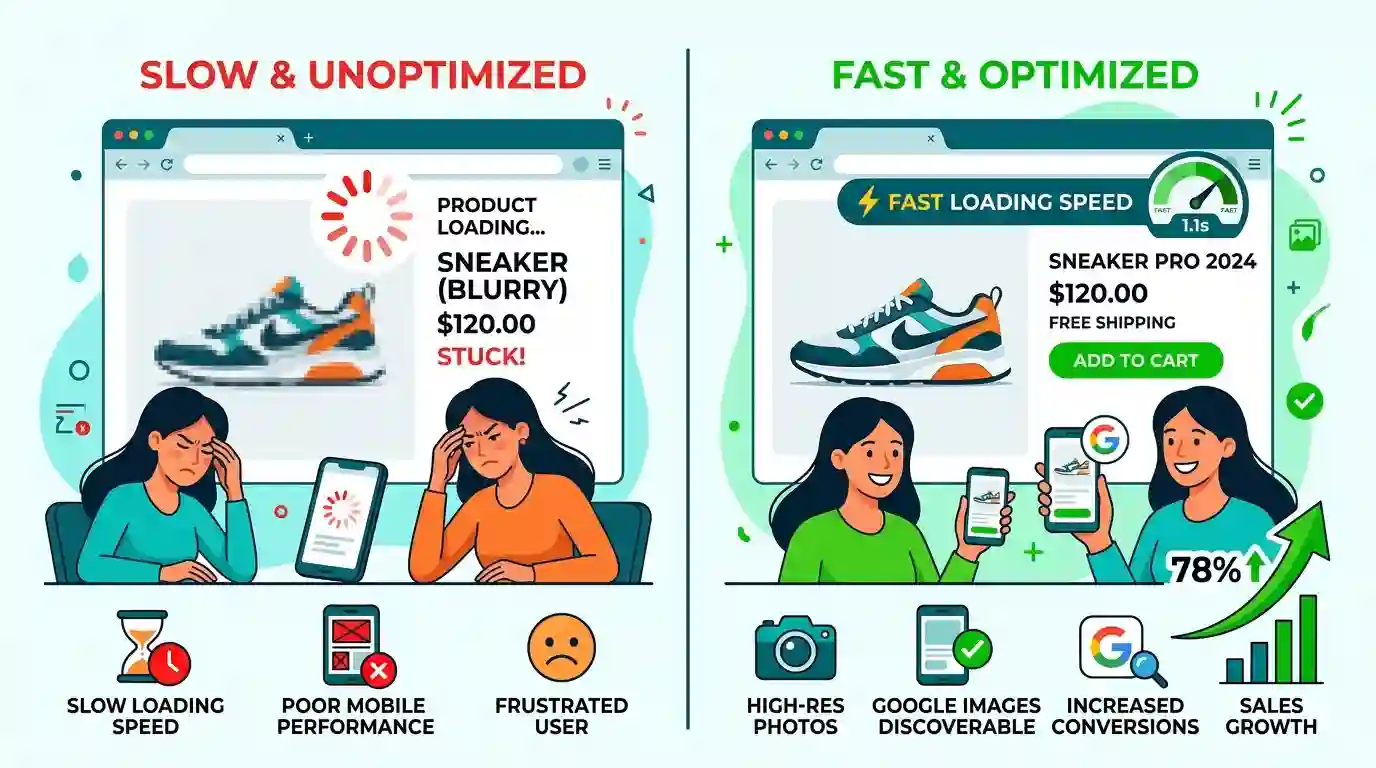
However, large and unoptimized images can slow down your website. Slow product pages can increase bounce rate, reduce conversions, and make it harder for search engines to crawl and understand your content. Image optimization solves this problem by balancing visual quality with performance.
Optimized ecommerce images help with:
- Faster page loading speed
- Better Core Web Vitals
- Improved Google Images visibility
- Higher mobile usability
- Better accessibility for screen readers
- Stronger product page SEO
- Lower bandwidth usage
- Better shopping experience
- More professional brand presentation
For ecommerce websites, image SEO is not optional. It is part of technical SEO, on-page SEO, conversion rate optimization, and user experience design.
2. How to Optimize Ecommerce Product Images for SEO
To optimize ecommerce product images for SEO, you need to help both search engines and users understand the image. Google cannot evaluate an image in the same way a human shopper does, so it relies on surrounding signals such as file name, alt text, page content, structured data, captions, image quality, and technical accessibility.
Google recommends making images discoverable, using responsive image techniques, providing useful context, and optimizing images for speed and quality through its official image SEO guidance.
A strong ecommerce image SEO strategy includes:
- Descriptive image file names
- Unique and useful alt attributes
- Relevant surrounding product content
- Fast-loading image formats
- Proper image dimensions
- Responsive images for mobile and desktop
- Image compression
- Product schema markup
- Open Graph images for social sharing
- Clean URL structure
- Crawlable image files
For example, instead of uploading a product image with a name like:
IMG_7834.jpg
Use a descriptive file name such as:
black-leather-crossbody-bag-front-view.jpg
This gives search engines more context about the product and helps improve topical relevance.
Use Semantic Relevance Around Images
Search engines also look at the text around an image. If your product image appears near a product title, feature list, customer benefit, price, reviews, and detailed description, the image becomes easier to understand.
For example, a product page selling running shoes should include related semantic terms such as:
- breathable mesh upper
- cushioned sole
- lightweight running shoes
- men’s athletic footwear
- shock absorption
- trail running
- gym training shoes
- size guide
- product gallery
- customer reviews
These related entities and LSI keywords help search engines understand the full product context.
3. Choose the Right Image Format for Ecommerce
Choosing the right image format is one of the easiest ways to improve ecommerce image performance. Different formats are better for different use cases.
JPEG
JPEG is best for standard product photography, lifestyle images, and images with many colors. It offers a good balance between quality and file size. Most ecommerce stores use JPEG for product images because it works well across browsers and platforms.
PNG
PNG is better for images that need transparency, sharp edges, icons, logos, and graphics. However, PNG files are often larger than JPEG files, so they should be used carefully on product pages.
If your PNG images do not require transparency, you can reduce file size by converting them to JPG using the PNG to JPG Converter.
WebP
WebP is a modern image format that often provides smaller file sizes while maintaining strong visual quality. It is useful for ecommerce stores that want faster-loading product galleries, category pages, and homepage banners.
SVG
SVG is ideal for logos, icons, badges, and simple vector graphics. It is not usually used for product photography, but it can be helpful for trust badges, payment icons, and size guide illustrations.
Recommended Ecommerce Image Format Strategy
Use JPEG or WebP for product photography, PNG only when transparency is needed, and SVG for icons or simple graphics. This gives your store a practical balance between speed, quality, and browser compatibility.
4. Compress Product Images Without Losing Quality
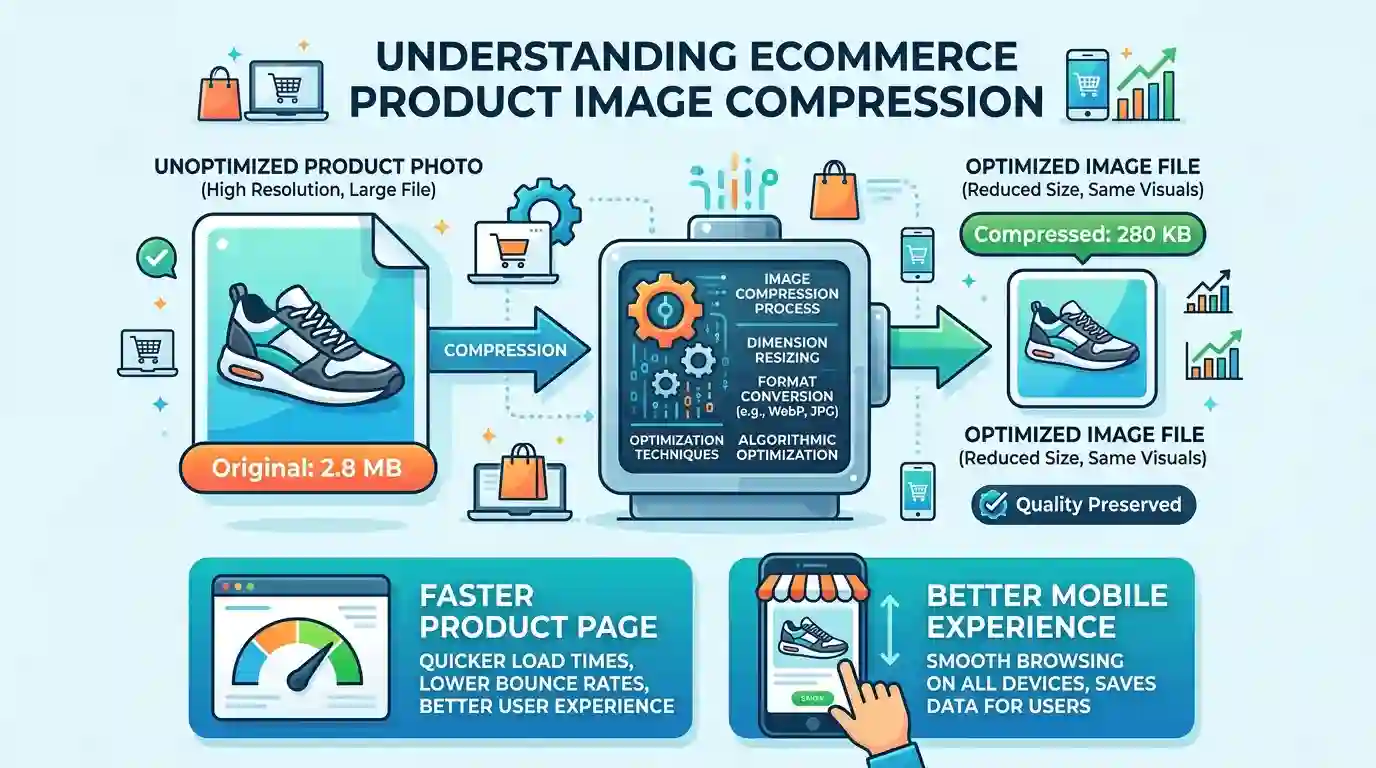
Image compression reduces file size so your product pages load faster. The goal is not to make images look low-quality. The goal is to remove unnecessary file weight while keeping the product visually attractive.
There are two main types of compression:
Lossy Compression
Lossy compression reduces image size by removing some image data. It can create very small files, but too much compression may make product images look blurry or pixelated.
Lossless Compression
Lossless compression reduces file size without visibly reducing quality. It is usually better for logos, graphics, and images where every detail matters, but file size savings may be smaller.
Best Compression Practices for Ecommerce
Compress every product image before uploading it to your store. Large image files can slow down product pages, especially when a page includes several gallery photos, thumbnails, color variations, and zoom images.
A good ecommerce compression workflow includes:
- Exporting images at the correct dimensions
- Removing unnecessary metadata
- Compressing files before upload
- Testing visual quality
- Checking page speed after upload
- Replacing oversized images in existing listings
For most ecommerce stores, the best approach is to keep the product image visually sharp while reducing the file size as much as possible.
5. Write SEO-Friendly Image File Names
Image file names are a simple but often ignored part of ecommerce SEO. Before uploading an image, rename the file using descriptive words that explain what the image shows.
A good product image file name should be:
- Short
- Descriptive
- Relevant
- Lowercase
- Separated with hyphens
- Free from keyword stuffing
Good File Name Examples
white-ceramic-coffee-mug.jpg
mens-blue-denim-jacket-front.webp
gold-round-wall-mirror-lifestyle.jpg
wireless-bluetooth-headphones-black-side-view.jpg
Bad File Name Examples
IMG000923.jpg

product-final-new-2.png

best-cheap-buy-online-discount-product-sale.jpg

DSC_7788.jpeg
Search engines and users benefit from clarity. A file name should describe the image naturally. Do not overload it with repeated keywords.
File Name Template for Product Galleries
For ecommerce product galleries, you can use a consistent naming structure:
product-name-main.jpg

product-name-front-view.jpg

product-name-side-view.jpg

product-name-back-view.jpg

product-name-detail-shot.jpg

product-name-lifestyle.jpg
This makes your media library more organized and improves image relevance.
6. Use Alt Text That Helps Search Engines and Shoppers
Alt text is the written description of an image. It helps search engines understand image content and helps screen readers describe images to visually impaired users.
Good alt text should describe the image accurately. It should not be stuffed with keywords. For ecommerce, alt text should often include the product name, color, type, and important visible details.
Good Alt Text Examples
For a product image of a black leather handbag:
Black leather crossbody handbag with gold zipper and adjustable strap
For a product image of a wooden dining table:
Oak wooden dining table with four matching chairs in a modern dining room
For a product image of blue running shoes:
Blue lightweight running shoes with white cushioned sole
Bad Alt Text Examples
image
product photo
best shoes buy shoes running shoes cheap shoes online
IMG_123
Alt Text for Multiple Product Images
If a product page has several images, avoid using the same alt text for every image. Describe each view separately.
Example:
- Main image: Black leather crossbody handbag with gold zipper
- Side image: Side view of black leather crossbody handbag showing adjustable strap
- Detail image: Close-up of gold zipper and textured leather on black handbag
- Lifestyle image: Model wearing black leather crossbody handbag with casual outfit
This improves accessibility and gives search engines more useful image context.
7. Resize Images for Faster Product Pages
Many ecommerce store owners upload images directly from a camera or design tool without resizing them. This creates a major performance issue. A product photo from a camera may be 4000 pixels wide, while your product page may only display it at 800 pixels wide.
When a browser loads an oversized image, users download unnecessary file weight. This slows down the page, especially on mobile networks.
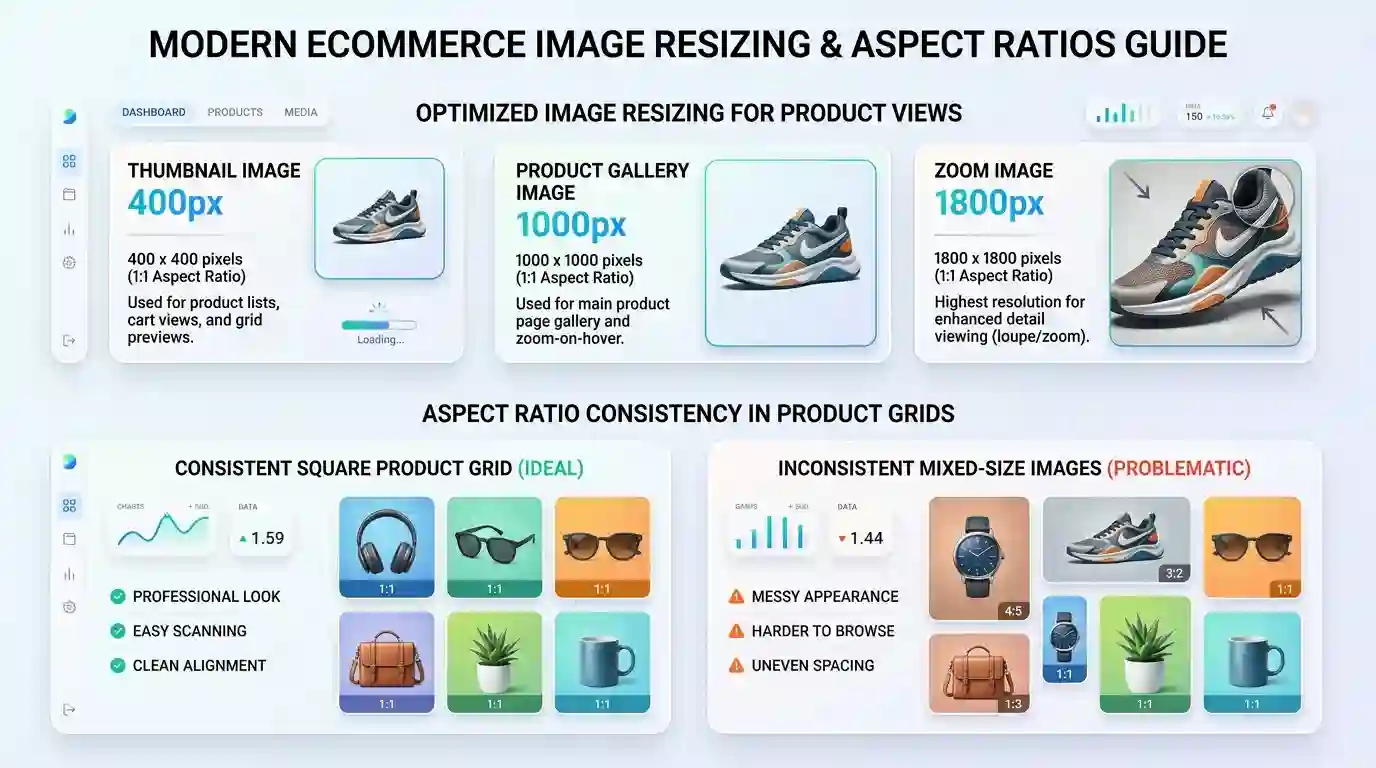
Before uploading product images, resize them based on where they will appear:
Common Ecommerce Image Sizes
- Product thumbnails: 300–500 px wide
- Product gallery images: 800–1200 px wide
- Zoom images: 1600–2000 px wide
- Category images: 600–1000 px wide
- Blog images: 1200 px wide
- Hero banners: 1600–2400 px wide
The ideal size depends on your theme, design, layout, and zoom requirements. For WordPress stores, you can learn more about image sizing in this guide on how to Resize Images for WordPress.
Keep Aspect Ratios Consistent
Product grids look more professional when image aspect ratios are consistent. If one product image is square, another is vertical, and another is horizontal, your category page may look messy.
Common ecommerce aspect ratios include:
- 1:1 square images
- 4:5 vertical images
- 3:2 lifestyle images
- 16:9 banners
Choose a format that suits your products and keep it consistent across the store.
8. Improve Mobile Product Image Performance
Most ecommerce shoppers browse on mobile devices, so mobile image optimization is essential. A product image that looks good on desktop but loads slowly on mobile can damage the shopping experience.
Mobile optimization includes:
- Responsive images
- Correct image dimensions
- Lazy loading
- Compressed files
- Touch-friendly product galleries
- Fast-loading thumbnails
- Clear zoom functionality
- Swipe-friendly image sliders
Use Responsive Images
Responsive images allow browsers to load the best image size for each device. A desktop user may need a larger image, while a mobile user should receive a smaller version.
This improves page speed and reduces wasted bandwidth.
Use Lazy Loading
Lazy loading delays off-screen images until the user scrolls near them. This is helpful for ecommerce category pages with many products.
For example, a collection page with 40 products does not need to load every image immediately. Lazy loading allows the first visible products to load first, improving perceived speed.
Optimize Product Gallery UX
Mobile product galleries should be easy to swipe, zoom, and navigate. Use clear thumbnails, avoid tiny controls, and make sure the main image does not shift unexpectedly while loading.
9. Use Image Sitemaps, Schema, and Structured Data
Technical SEO helps search engines discover and understand your product images. If your images are hidden behind scripts, loaded incorrectly, or blocked from crawling, they may not perform well in image search.
Image Sitemaps
An image sitemap helps search engines discover important images on your website. This is especially useful for large ecommerce stores with thousands of products.
Your sitemap can include product image URLs, category images, and other important visual assets. Many SEO plugins and ecommerce platforms can generate image sitemaps automatically.
Product Schema
Product schema gives search engines structured information about your product, such as name, price, availability, reviews, and images. When implemented correctly, it can help your listings become more understandable in search.
Open Graph Images
Open Graph images control how your product pages appear when shared on social platforms. Use a clear, high-quality product image that represents the page well.
A strong Open Graph image should:
- Show the main product clearly
- Avoid excessive text
- Use a clean background
- Match the product page
- Be high-resolution
- Load from a stable URL
10. Product Image UX Tips That Increase Conversions
SEO brings visitors to your ecommerce store, but user experience helps convert them into customers. Product image optimization should support the buying journey.
Show Multiple Product Angles
Customers want to see the product from different views. Include front, side, back, close-up, scale, and lifestyle images when possible.
For example, a clothing product should show:
- Front view
- Back view
- Fabric close-up
- Model wearing the item
- Size or fit reference
- Color variations
Use Lifestyle Images
Lifestyle images show the product in real use. They help shoppers imagine how the product fits into their life.
For example:
- A sofa shown in a living room
- Running shoes shown on a trail
- A coffee mug shown on a desk
- A handbag shown with an outfit
- Kitchen tools shown during cooking
Add Detail Shots
Close-up images help shoppers inspect material, stitching, texture, buttons, finish, and quality. These details reduce uncertainty and can increase purchase confidence.
Include Scale References
Customers often hesitate when they cannot understand product size. Add images that show scale, such as a model holding the item, furniture in a room, or a product beside common objects.
Keep Backgrounds Clean
Clean backgrounds make products easier to see. White or neutral backgrounds work well for main product images, while lifestyle images can use more natural scenes.

11. Common Ecommerce Image Optimization Mistakes
Even well-designed online stores often make image SEO mistakes. Avoiding these issues can quickly improve performance and visibility.
Uploading Huge Original Files
Do not upload raw camera files directly to your ecommerce store. Resize and compress them first.
Using Generic File Names
File names like IMG_2026.jpg or photo1.png do not provide useful context. Rename files before upload.
Repeating the Same Alt Text
Each product image should have unique alt text based on what the image shows.
Overcompressing Images
Too much compression can make product images look blurry. This can reduce trust and make products appear lower quality.
Ignoring Mobile Users
Always test product pages on mobile. Images should load quickly, display clearly, and support easy swiping or zooming.
Using Too Many Unnecessary Images
Multiple images are helpful, but too many oversized images can slow down the page. Use only images that support the buying decision.
Forgetting Image Consistency
Inconsistent image sizes, lighting, backgrounds, and angles can make a store look unprofessional.
12. Ecommerce Product Image Optimization Checklist
Use this checklist before publishing a product page:
- Product image is clear and high quality
- Image is resized to the correct dimensions
- File size is compressed
- Correct format is used: JPEG, PNG, WebP, or SVG
- File name is descriptive
- Alt text describes the image naturally
- Product gallery includes multiple useful views
- Image background is clean
- Mobile display is tested
- Lazy loading is enabled where appropriate
- Product schema includes image data
- Open Graph image is set
- Image is included in sitemap
- Page speed is tested
- Product grid image ratios are consistent
This workflow helps you create product pages that are fast, searchable, accessible, and conversion-focused.
Conclusion
Optimizing ecommerce product images is one of the highest-impact improvements you can make to an online store. Images affect SEO, page speed, accessibility, customer trust, product understanding, and conversion rate.
To get the best results, start with high-quality product photography, choose the right image format, resize every image, compress files carefully, write descriptive file names, add useful alt text, and make sure your images work well on mobile devices. Then improve your technical SEO with image sitemaps, structured data, responsive images, and Open Graph tags.
When done correctly, image optimization helps your ecommerce store load faster, rank better, and deliver a smoother shopping experience. The goal is simple: make every product image beautiful for shoppers and understandable for search engines.
FAQs
1. What does it mean to optimize ecommerce product images?
To optimize ecommerce product images means improving image quality, file size, format, dimensions, file names, alt text, mobile performance, and SEO signals so product pages load faster and rank better.
2. What is the best image format for ecommerce product images?
JPEG and WebP are usually best for ecommerce product photos. PNG is useful when transparency is needed, while SVG is best for icons and logos.
3. How big should ecommerce product images be?
Most product gallery images are commonly around 800–1200 pixels wide, while zoom images may be 1600–2000 pixels wide. The best size depends on your store layout and theme.
4. Does image alt text help ecommerce SEO?
Yes. Alt text helps search engines understand images and improves accessibility for users who rely on screen readers. It should describe the image naturally and accurately.
5. Should I use the same alt text for every product image?
No. Each image should have unique alt text based on what it shows, such as front view, side view, close-up detail, color variation, or lifestyle use.
6. How do product images affect page speed?
Large image files increase page weight and take longer to load. Resizing, compressing, and using modern formats can make product pages much faster.
7. Can optimized product images rank in Google Images?
Yes. Product images can appear in Google Images when they are crawlable, relevant, high quality, supported by useful page content, and optimized with proper SEO signals.
8. How many images should a product page have?
A product page should have enough images to answer customer questions. Most products benefit from a main image, multiple angles, close-ups, lifestyle images, and scale references.
9. Is image compression bad for product quality?
Not if done correctly. Proper compression reduces file size while keeping the image visually sharp. Overcompression should be avoided because it can make products look blurry.
10. What is the fastest way to optimize existing ecommerce images?
Start with your most important product and category pages. Resize oversized images, compress large files, rename unclear file names, update alt text, and test page speed after changes.