Summary
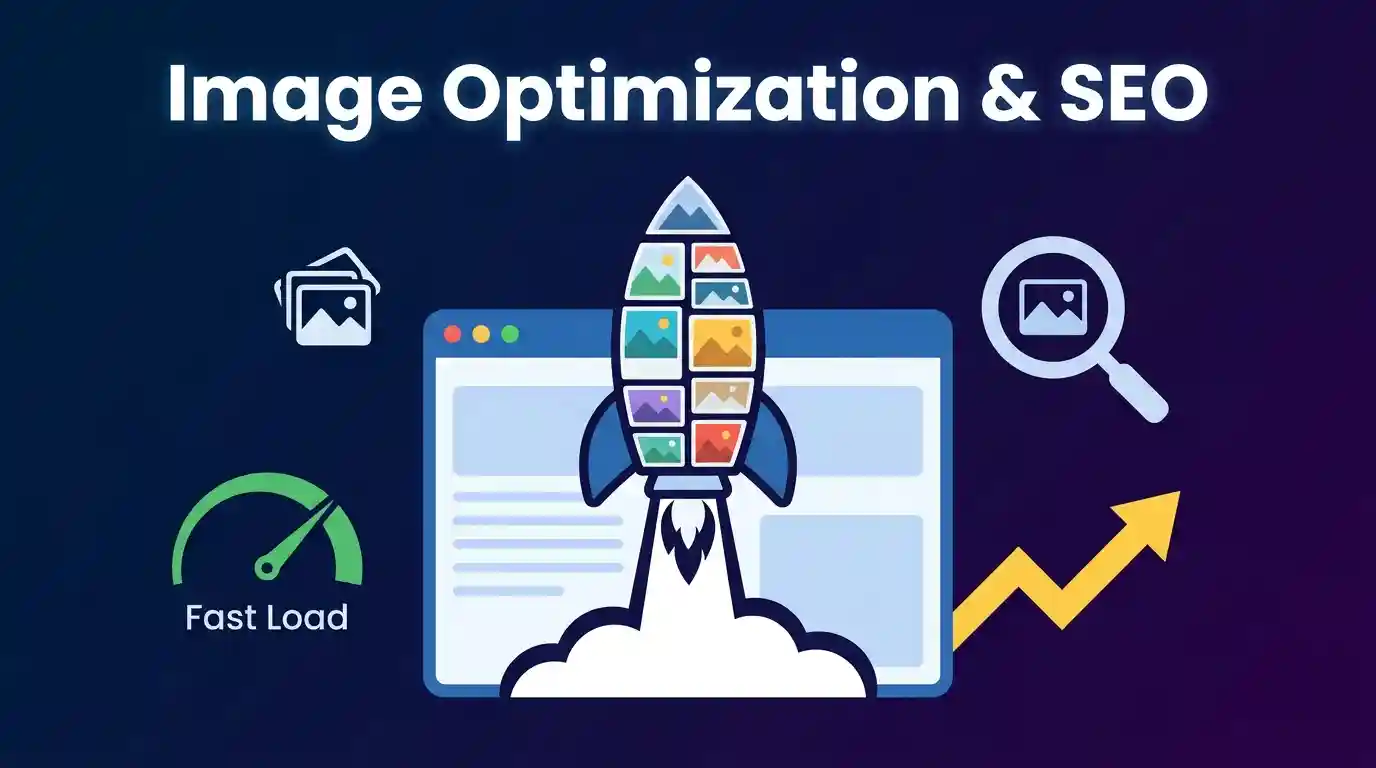
How Image Optimization Improves SEO? Image optimization is one of the most underutilized yet high-impact SEO strategies available to website owners. By compressing images, choosing modern formats like WebP, writing keyword-rich alt text, implementing structured data, and ensuring fast delivery through a CDN, websites dramatically improve page speed, Core Web Vitals scores, user experience, and organic search visibility. Optimized images not only help Google crawl and understand page content more effectively, but they also unlock an entirely separate traffic channel through Google Image Search — making image SEO a dual-benefit discipline that directly contributes to higher rankings, lower bounce rates, and more conversions.
Table of Contents
What Is Image Optimization in SEO?
- The Role of Images in Modern Search Engines
- How Search Engines Crawl and Index Images
Why Image Optimization Matters for SEO Performance
- Page Speed and Core Web Vitals
- User Experience Signals and Bounce Rate
- Image Search as a Traffic Channel
Choosing the Right Image Format for the Web
- JPEG, PNG, GIF — Legacy Formats
- WebP — The Modern Standard
- AVIF and Next-Gen Formats
Image Compression: Lossy vs. Lossless
- How Compression Reduces File Size Without Killing Quality
- Tools and Workflows for Compressing Images
Descriptive File Names and SEO
- How to Name Image Files for Search Engines
- Common Naming Mistakes to Avoid
Alt Text Optimization — The Most Critical On-Page Factor
- Writing Alt Text That Ranks
- Alt Text for Decorative vs. Informational Images
Image Dimensions, Responsive Images, and Lazy Loading
- Setting Width and Height Attributes
- srcset and sizes for Responsive Images
- Lazy Loading and Its SEO Impact
Structured Data and Image Sitemaps
- Adding Schema Markup to Images
- Creating and Submitting an Image Sitemap
CDN Delivery and Image Hosting Best Practices
- How a CDN Improves Image Load Speed
- Image Hosting on Your Own Domain vs. Third-Party
Advanced Image SEO Techniques
- Open Graph and Twitter Card Images
- Leveraging Image Captions for Keyword Density
- Duplicate Image Issues and Canonical Tags
Measuring Image SEO Performance
- Google Search Console Image Insights
- PageSpeed Insights and Lighthouse
Frequently Asked Questions (FAQs)
How Image Optimization Improves SEO: Everything You Need to Know
Images are the single largest contributor to page weight on most websites. They are also among the most mismanaged assets in digital marketing. While content creators and SEO professionals spend hours crafting keyword-rich copy, they often neglect the visual elements that silently drag down page performance, weaken crawlability, and suppress search rankings. This guide covers everything — from file format selection to structured data — so you can build a fully optimized image pipeline that feeds both users and search engines exactly what they need.
What Is Image Optimization in SEO?
Image optimization in SEO refers to the process of delivering images in the most efficient format, size, and structure so that they load fast, communicate meaning to search engines, and contribute positively to a page’s ranking signals. It encompasses technical decisions (file format, compression level, dimensions), on-page decisions (file names, alt text, captions), and infrastructure decisions (CDN delivery, caching headers, lazy loading).
The Role of Images in Modern Search Engines
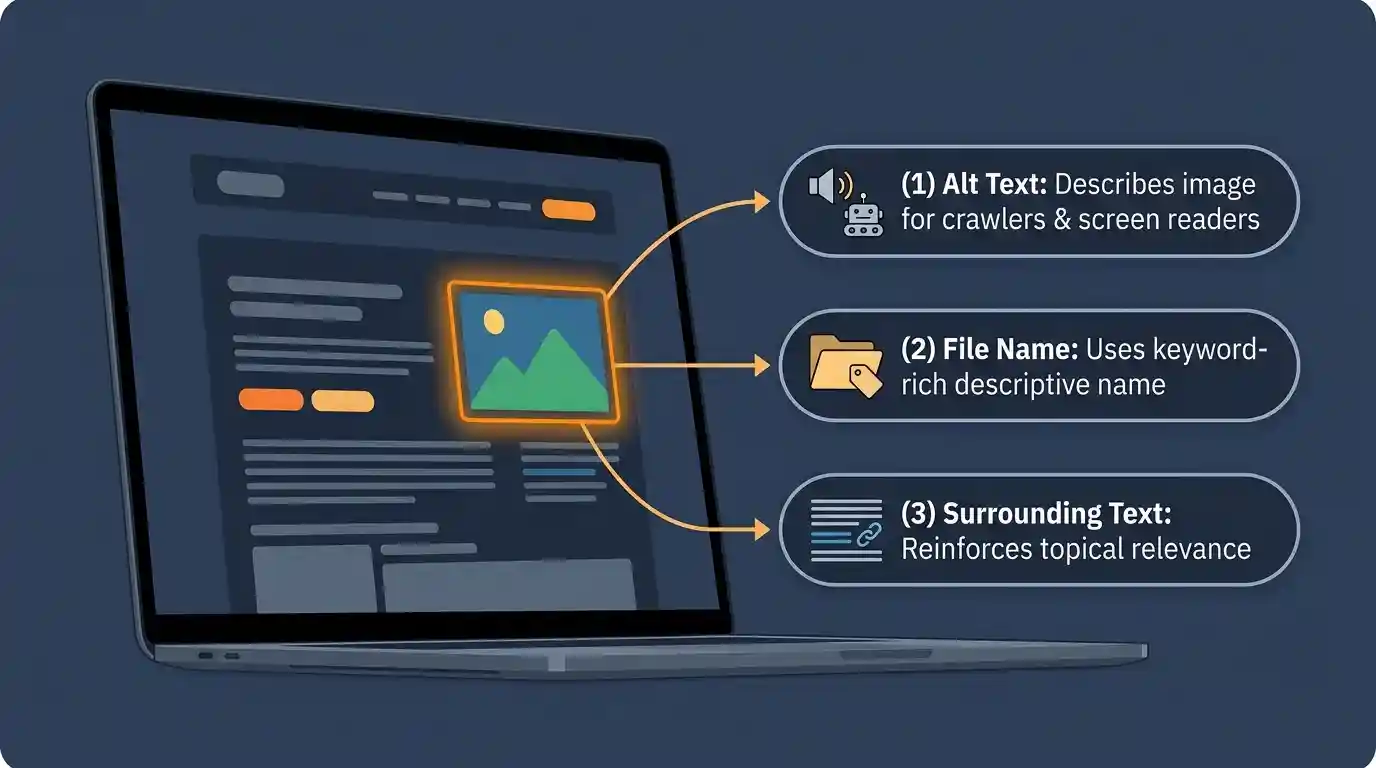
Search engines like Google have evolved significantly in their ability to process visual content. Google’s Vision AI technology can now identify objects, text, landmarks, and even sentiment within images. However, search engines still rely heavily on textual signals surrounding an image — alt text, file name, caption, surrounding paragraph copy — to accurately understand and index what an image depicts.
Images serve several SEO functions simultaneously:
- Relevance signals: Images with descriptive alt text reinforce the topical relevance of a page.
- Engagement signals: Visually rich pages tend to have lower bounce rates and higher time-on-page — indirect ranking factors.
- Independent ranking opportunities: Images appear in Google Image Search, Google Discover, and rich results, generating additional organic impressions.
- Semantic context: NLP-based algorithms analyze the co-occurrence of image attributes and surrounding text to build a topical model of the page.
How Search Engines Crawl and Index Images
Googlebot follows <img> tags within HTML, reads the src attribute, fetches the image file, and processes its metadata. It also reads the alt attribute, title attribute, file name, surrounding anchor text, and structured data markup. Images blocked by robots.txt or placed inside JavaScript-rendered content that isn’t pre-rendered can be missed entirely — a critical technical pitfall.
Google’s Image Search index is separate from its web index. Pages must pass a quality threshold before their images are eligible for Image Search. This means page-level authority, load speed, and structured data all play a role in whether your images surface visually on Google.
Why Image Optimization Matters for SEO Performance
Page Speed and Core Web Vitals
Google’s Core Web Vitals — Largest Contentful Paint (LCP), Cumulative Layout Shift (CLS), and Interaction to Next Paint (INP) — are confirmed ranking factors since 2021. Images are the primary culprit behind poor LCP scores. The LCP element is, in the majority of cases, a hero image or a large above-the-fold visual. An unoptimized image that is 2–3 MB in size can push LCP well beyond the 2.5-second threshold Google considers “good.”
Optimizing images directly improves:
- LCP: Smaller, faster-loading images reduce the time to render the largest visible element.
- CLS: Setting explicit width and height attributes prevents layout shifts when images load.
- Total Blocking Time (TBT): Efficient image decoding reduces main-thread pressure.
According to Google’s web performance documentation, images account for the LCP element on over 70% of mobile pages — making image optimization a non-negotiable component of Core Web Vitals compliance.
User Experience Signals and Bounce Rate
Page speed is not just a technical metric — it is a direct determinant of user behavior. A one-second delay in mobile load time reduces conversions by up to 20%. When pages take too long to load because of bloated images, users abandon them. This behavioral data — high bounce rate, short session duration, low pages-per-session — feeds back into Google’s quality assessment algorithms.
Conversely, pages with fast-loading, high-quality images create immersive experiences that keep users engaged. Optimized images support visual storytelling, product discovery, and content comprehension, all of which extend session length and strengthen engagement signals.
Image Search as a Traffic Channel
Google Image Search receives billions of queries every month. For certain industries — e-commerce, food, travel, interior design, fashion, photography — image search traffic can rival or exceed blog-driven organic traffic. Properly optimized images with descriptive metadata, appropriate structured data, and fast delivery are eligible to appear not just in standard Image Search but also in Google Discover feeds, Knowledge Panels, and visual carousels in standard SERPs.
Neglecting image optimization means forfeiting this entire traffic channel.
Choosing the Right Image Format for the Web
JPEG, PNG, GIF — Legacy Formats
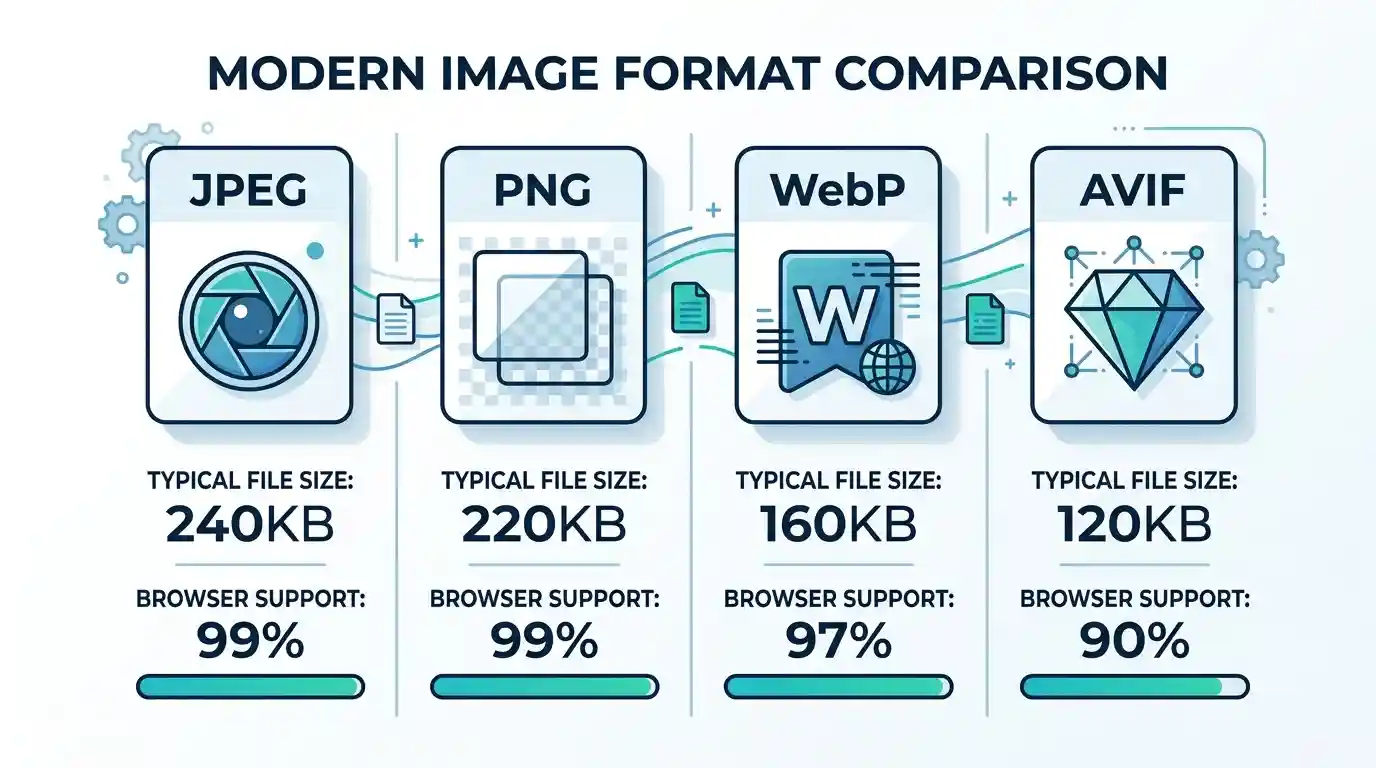
JPEG (or JPG): Best for photographs and complex images with gradients. Uses lossy compression. Widely supported but lacks transparency.
PNG: Best for images with sharp edges, text, logos, or transparency. Uses lossless compression, resulting in larger file sizes than JPEG.
GIF: Limited to 256 colors. Now largely obsolete for animation; replaced by video formats and WebP.
These legacy formats are still widely used, but they carry unnecessary file weight compared to modern alternatives.
WebP — The Modern Standard
WebP, developed by Google, delivers superior compression compared to JPEG and PNG — typically 25–35% smaller at equivalent visual quality. It supports both lossy and lossless compression, as well as transparency and animation. WebP is now supported by all major browsers.
For any website targeting fast load times and strong Core Web Vitals, converting images to WebP is the single most impactful format-level decision you can make. Learn How to Convert Images to WebP with a step-by-step workflow, and if you need a quick solution, you can convert JPG to WebP online without installing any software.
AVIF and Next-Gen Formats
AVIF (AV1 Image File Format) is the next frontier in image compression — offering 50% smaller files than JPEG at similar quality. Browser support is growing rapidly, and platforms like Cloudflare and Cloudinary already serve AVIF automatically when supported. While adoption is still maturing, forward-thinking SEOs should plan AVIF into their long-term image strategy.
For a deeper comparison of all available options, read our guide on the Best Image Format for Websites to match format choice to your specific use case.
Image Compression: Lossy vs. Lossless
How Compression Reduces File Size Without Killing Quality
Image compression works by removing redundant or perceptually irrelevant data from an image file. There are two primary approaches:
Lossy compression permanently removes image data. The more you compress, the more quality degrades. JPEG and WebP (in lossy mode) use this approach. For web use, a quality setting between 75–85% is typically the sweet spot — visually indistinguishable from the original but significantly smaller in file size.
Lossless compression reorganizes data more efficiently without discarding any information. PNG and WebP (in lossless mode) use this approach. The resulting file is larger than lossy but pixel-perfect.
For most web images — especially photographs — lossy compression at a high quality setting delivers the best balance of file size and visual fidelity. For product images, logos, and UI elements where sharpness is critical, lossless is preferred.
Tools and Workflows for Compressing Images
- Squoosh (browser-based, by Google): Excellent for manual, high-control compression
- ImageOptim (Mac): Batch lossless optimization
- ShortPixel / Imagify / Smush (WordPress plugins): Automate compression on upload
- Cloudinary / Imgix: Cloud-based, dynamic image optimization with format negotiation
- CLI tools (cwebp, libvips, imagemagick): For automated build pipelines
A proper compression workflow should be integrated into your CMS or deployment pipeline so every image is optimized before it ever reaches a user’s browser.
Descriptive File Names and SEO
How to Name Image Files for Search Engines
File names are a direct, crawlable signal that communicates image content to search engines. Googlebot reads the file name before it reads anything else about an image.
Best practices:
- Use lowercase letters and hyphens (not underscores or spaces): image-optimization-seo-guide. webp
- Include the primary keyword naturally: red-running-shoes-mens. webp
- Be specific and descriptive: chocolate-lava-cake-dessert-recipe.webp
- Keep it concise: 3–5 words is ideal
Common Naming Mistakes to Avoid
- IMG_4821.jpg — Meaningless to crawlers
- photo1.jpeg — Generic, no keyword value
- banner_final_v3_USE THIS ONE.png — Spaces and special characters cause encoding issues
- Keyword stuffing: seo-image-optimization-best-seo-images-seo.webp — Likely flagged as spam
Alt Text Optimization — The Most Critical On-Page Factor
Writing Alt Text That Ranks
Alt text (alternative text) is an HTML attribute on <img> tags that serves three simultaneous purposes: accessibility for screen readers, a fallback when images fail to load, and a primary semantic signal for search engines. It is arguably the single most important on-page image SEO element.
Formula for effective alt text:
[Primary keyword] + [descriptive context] + [page topic if relevant]
Examples:
- Weak: alt=” image.”
- Better: alt=”running shoes.”
- Optimized: alt=”mens red lightweight running shoes for marathon training.”
Alt text should read naturally — it is read aloud by screen readers to visually impaired users, so keyword stuffing creates a terrible accessibility experience and can trigger spam filters.
Alt Text for Decorative vs. Informational Images
Not every image needs alt text. Decorative images — dividers, background textures, abstract design elements — should use an empty alt attribute (alt=””) so screen readers skip them. Forcing descriptive alt text onto decorative images creates noise in both the accessibility experience and the semantic signal landscape.
Informational images — charts, product photos, instructional diagrams, infographics — should always have thorough, keyword-relevant alt text.
Image Dimensions, Responsive Images, and Lazy Loading
Setting Width and Height Attributes
Always set explicit width and height attributes on <img> tags. This allows the browser to reserve the correct space before the image loads, preventing Cumulative Layout Shift (CLS) — a Core Web Vitals signal that directly impacts rankings.
<img src=”image-optimization-seo.webp“ alt=”image optimization for seo“ width=”800“ height=”450“>
srcset and sizes for Responsive Images
Responsive images ensure that mobile users receive appropriately sized images rather than a desktop-scale image scaled down via CSS. Use the srcset attribute to provide multiple image resolutions:
<img

  src="hero-800.webp"

  srcset="hero-400.webp 400w, hero-800.webp 800w, hero-1200.webp 1200w"

  sizes="(max-width: 600px) 400px, (max-width: 900px) 800px, 1200px"

  alt="image optimization seo guide"

  width="1200" height="675"

>
This technique dramatically reduces mobile data usage and improves LCP on mobile devices, where Google predominantly indexes pages (mobile-first indexing).
Lazy Loading and Its SEO Impact
Lazy loading defers the loading of off-screen images until the user scrolls near them, reducing initial page load time and Time to First Byte (TTFB) perception. Use the native loading=”lazy” attribute:
<img src=”below-fold-image.webp“ loading=”lazy“ alt=”…“ width=”800“ height=”450“>
Important: Never lazy-load above-the-fold images, especially your LCP element. Lazy loading the hero image will actively worsen your LCP score. Reserve it for images that appear below the fold.
Structured Data and Image Sitemaps
Adding Schema Markup to Images
Structured data (schema.org markup) communicates image context to search engines in a machine-readable format. For product pages, recipe posts, article pages, and local business listings, image schema can unlock rich results in Google SERPs — visual carousels, product image boxes, recipe cards — which dramatically improve click-through rates.
Example for an article using JSON-LD:
{

  "@context": "https://schema.org",

  "@type": "Article",

  "headline": "How Image Optimization Improves SEO",

  "image": "https://example.com/image-optimization-seo.webp"

}
For e-commerce, a product schema with image properties makes product photos eligible for Google Shopping image placements.
Creating and Submitting an Image Sitemap
An image sitemap (or image tags within your standard XML sitemap) tells Google about images it may not discover through standard crawling — particularly images loaded via JavaScript or CSS background-image properties.
<url>

  <loc>https://example.com/image-seo-guide/</loc>

  <image:image>

    <image:loc>https://example.com/images/image-optimization-seo.webp</image:loc>

    <image:title>How Image Optimization Improves SEO</image:title>

    <image:caption>A complete guide to image SEO best practices</image:caption>

  </image:image>

</url>
Submit your sitemap through Google Search Console to accelerate indexing.
CDN Delivery and Image Hosting Best Practices

How a CDN Improves Image Load Speed
A Content Delivery Network (CDN) stores copies of your images on servers distributed globally. When a user requests a page, images are served from the nearest geographic node rather than your origin server — reducing latency, server load, and time to first byte.
Leading CDNs for image delivery include Cloudflare, Fastly, KeyCDN, and BunnyCDN. Platforms like Cloudinary and ImageKit go further by offering dynamic image transformation — serving WebP or AVIF automatically based on browser capability, resizing on the fly, and applying compression settings without any code changes.
Image Hosting on Your Own Domain vs. Third-Party
For SEO, hosting images on your own domain (or a subdomain/CDN mapped to your domain) is preferred. When images are hosted on a third-party domain (like a generic image hosting service), the link authority and crawl signals flow to that domain, not yours. Your images should live at yoursite.com/images/ or be proxied through a CDN that uses your domain as the base URL.
Advanced Image SEO Techniques
Open Graph and Twitter Card Images
Open Graph (og:image) and Twitter Card (twitter:image) meta tags define the image that appears when your page is shared on social media. While these are not direct ranking factors, they significantly influence click-through rates from social channels. A compelling, correctly sized social share image (1200×630px for Open Graph) increases social traffic, which in turn builds links and brand signals that feed into long-term SEO.
Leveraging Image Captions for Keyword Density
Captions — the text displayed below images — are among the most-read copy on any page. Eye-tracking studies consistently show that readers scan captions before body paragraphs. Captions are also indexed by search engines as regular page text, making them a natural opportunity to incorporate LSI keywords and supporting phrases without disrupting article flow.
Write captions that are informative, contextual, and naturally include secondary keywords related to the image content.
Duplicate Image Issues and Canonical Tags
If the same image appears across multiple URLs — common in e-commerce product variants or syndicated content — Google may see these as duplicate images and dilute their indexing value. Use canonical tags on the page level to consolidate signals. For image-specific issues, ensure that each image URL is unique and consistently referenced. Avoid serving the same image file from multiple paths (e.g., /img/photo.jpg and /assets/photo.jpg).
Measuring Image SEO Performance
Google Search Console Image Insights
Google Search Console’s Performance report allows you to filter by “Search type: Image” to see which images are generating impressions and clicks in Google Image Search. Key metrics to monitor:
- Image impressions: How often your images appear in Image Search
- Image clicks: Traffic actually driven by Image Search
- Average position: Where images rank in Image Search results
The Coverage report can also surface indexing errors specific to images — useful for diagnosing sitemap or crawl issues.
PageSpeed Insights and Lighthouse
Run regular audits using Google’s PageSpeed Insights or Chrome’s Lighthouse tool. These audits will flag:
- Images not in next-gen formats
- Images without explicit dimensions
- Improperly sized images (serving desktop images to mobile)
- Images not compressed optimally
- Off-screen images are not using lazy loading
Treat each audit as an action list. Systematically resolving flagged image issues will produce measurable improvements in Core Web Vitals scores within weeks of implementation.
Frequently Asked Questions (FAQs)
Q: Does image file size directly affect Google rankings? Yes — indirectly but significantly. Large image files slow page load speed, which degrades Core Web Vitals (especially LCP), which is a confirmed Google ranking factor.
Q: Is alt text required for every image? Not for decorative images. Decorative images should use alt=””. Informational and product images should always have descriptive alt text.
Q: What is the best image format for SEO in 2025? WebP is the current recommended standard for broad compatibility and compression efficiency. AVIF is the emerging next-gen option for cutting-edge performance.
Q: Does Google index images loaded via JavaScript? Google can render JavaScript, but it is slower and less reliable than indexing HTML-embedded images. For maximum crawlability, serve images in standard <img> tags within HTML.
Q: How many images should a blog post have? There is no fixed rule, but one relevant image per major section is a common best practice. Each image should add genuine informational value — not just visual padding.
Q: Can images hurt SEO? Yes. Uncompressed, oversized images slow pages down. Images without alt text miss a key accessibility and semantic signal. Broken image links create crawl errors. Images on third-party domains can dilute authority. All of these negatively impact SEO.