
Summary: A YouTube thumbnail is the first visual impression your video makes on a potential viewer, and getting the dimensions, file size, format, and design right is non-negotiable for channel growth. This guide YouTube Thumbnail Size Guide covers every aspect of YouTube thumbnail sizing — from the ideal pixel dimensions and aspect ratio to file format comparisons, mobile optimization, common mistakes, and design best practices — so your thumbnails consistently look sharp, professional, and click-worthy across every device and platform.
Table of Contents
- What Is a YouTube Thumbnail?
- YouTube Thumbnail Size: The Exact Specifications
- Best File Formats for YouTube Thumbnails
- How YouTube Displays Thumbnails Across Devices
- Designing a High-Converting YouTube Thumbnail
- Common YouTube Thumbnail Mistakes to Avoid
- Tools to Create and Optimize YouTube Thumbnails
- YouTube Thumbnail SEO: The Connection Between Visuals and Rankings
- YouTube Thumbnail Size for Shorts vs. Long-Form Videos
- Frequently Asked Questions About YouTube Thumbnail Sizes
What Is a YouTube Thumbnail?
A YouTube thumbnail is a still image that acts as a preview or cover for your video. It appears in search results, suggested video feeds, playlists, and on your channel homepage. Think of it as a book cover — it is the single visual element that competes for attention in a crowded feed.
YouTube allows creators to either let the platform auto-generate a thumbnail by pulling a random frame from the video or upload a custom thumbnail designed specifically for maximum impact. For any serious creator, custom thumbnails are always the superior choice.
Why Thumbnails Matter for CTR and SEO
Click-through rate (CTR) is one of the most critical metrics in the YouTube algorithm. It measures the percentage of people who see your thumbnail and title combination and actually click to watch. A high CTR signals to YouTube that your content is relevant and enticing, which causes the algorithm to push the video to more users — creating a compounding growth loop.
Thumbnails are not just aesthetic; they are a core part of your video’s discoverability and search engine optimization strategy on YouTube. Poor thumbnails can suppress even the best-quality videos into obscurity, while a well-designed thumbnail can make a mediocre video outperform far more polished content.
Auto-Generated vs. Custom Thumbnails
Auto-generated thumbnails are pulled from a random frame of your video — often a blurry mid-motion shot with an unflattering facial expression or an empty scene. They have virtually no design intent and almost always underperform. Custom thumbnails, on the other hand, are crafted intentionally with composition, contrast, readable text, and emotional resonance in mind. YouTube even restricts the custom thumbnail feature to accounts that are in good standing, which underlines how much the platform values this feature.
YouTube Thumbnail Size: The Exact Specifications
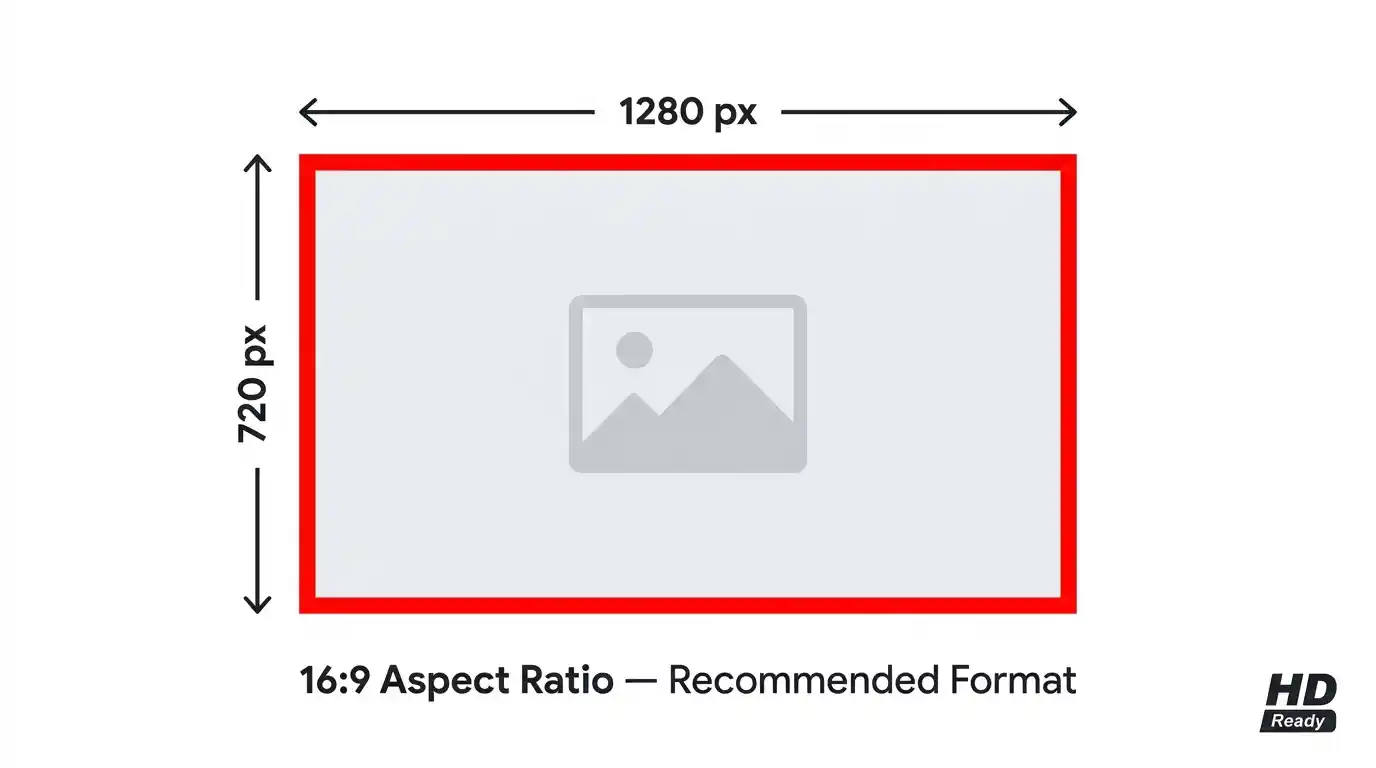
Getting the technical specifications right is the foundation of good thumbnail design. If you upload the wrong dimensions or exceed the file size limit, your thumbnail will either be rejected or display in a distorted, pixelated, or cropped format.
Recommended Dimensions and Resolution
The officially recommended YouTube thumbnail size is 1280 x 720 pixels. This dimension is the standard for high-definition content and ensures your thumbnail looks crisp on all screen sizes and resolutions. The minimum width YouTube accepts is 640 pixels, but uploading at this minimum is strongly discouraged because it results in a blurry thumbnail on modern high-DPI displays.
Always design and export thumbnails at 1280 x 720 pixels or higher. Some advanced creators even design at 2560 x 1440 pixels (double resolution) to future-proof against increasingly high-resolution screens, then export to 1280 x 720.
Aspect Ratio Explained
The correct aspect ratio for a YouTube thumbnail is 16:9. This is the same widescreen ratio used by most YouTube videos, meaning your thumbnail perfectly fills the preview space without any black bars, cropping, or letterboxing. This ratio is also the universal standard for desktop monitors, laptops, most mobile devices in landscape orientation, and modern televisions.
Designing in any other ratio — such as 4:3 or 1:1 — will result in pillarboxing or unexpected cropping in YouTube’s interface, which looks unprofessional and reduces visual impact.
Maximum File Size Allowed by YouTube
YouTube enforces a hard maximum file size limit of 2 MB for thumbnail uploads. This is a relatively generous limit for JPG files, but it can be a constraint if you are working with high-quality PNG files that contain transparency layers or complex gradients. Always compress your thumbnail before uploading to ensure compliance while maintaining visual quality.
Best File Formats for YouTube Thumbnails
YouTube supports three primary image formats for thumbnail uploads: JPG (JPEG), PNG, and WebP. Each has its own characteristics, strengths, and appropriate use cases.
JPG, PNG, and WebP — Which Should You Use?
JPG is the most widely used format for YouTube thumbnails. It uses lossy compression, which means it discards some image data to reduce file size — resulting in smaller files that almost always fall within YouTube’s 2 MB limit. JPG works best for thumbnails that contain photographs, realistic human faces, and complex background imagery.
PNG files are larger but support lossless compression, meaning no image data is discarded. PNG is ideal when your thumbnail has text overlays, sharp geometric shapes, logos, or transparent elements. However, PNG files can easily exceed 2 MB for complex designs, requiring compression before uploading.
WebP is a modern format developed by Google that offers significantly better compression than JPG or PNG at equivalent quality levels. If you want to understand the deeper technical and quality differences between these formats, read this detailed breakdown in JPG vs PNG vs WebP Explained to make a fully informed format decision for your thumbnails.
For most creators, JPG is the safest and most practical choice, offering a reliable balance between image quality and manageable file size.
When to Use PNG Over JPG
Use PNG for your YouTube thumbnail when your design includes a logo with a transparent background, crisp vector-based text, or brand elements that suffer from JPG’s compression artifacts (the subtle blurring and “blockiness” that appear around sharp edges). In these cases, the larger file size of PNG is a worthwhile trade-off for quality, provided the final file stays under 2 MB after compression.
How YouTube Displays Thumbnails Across Devices
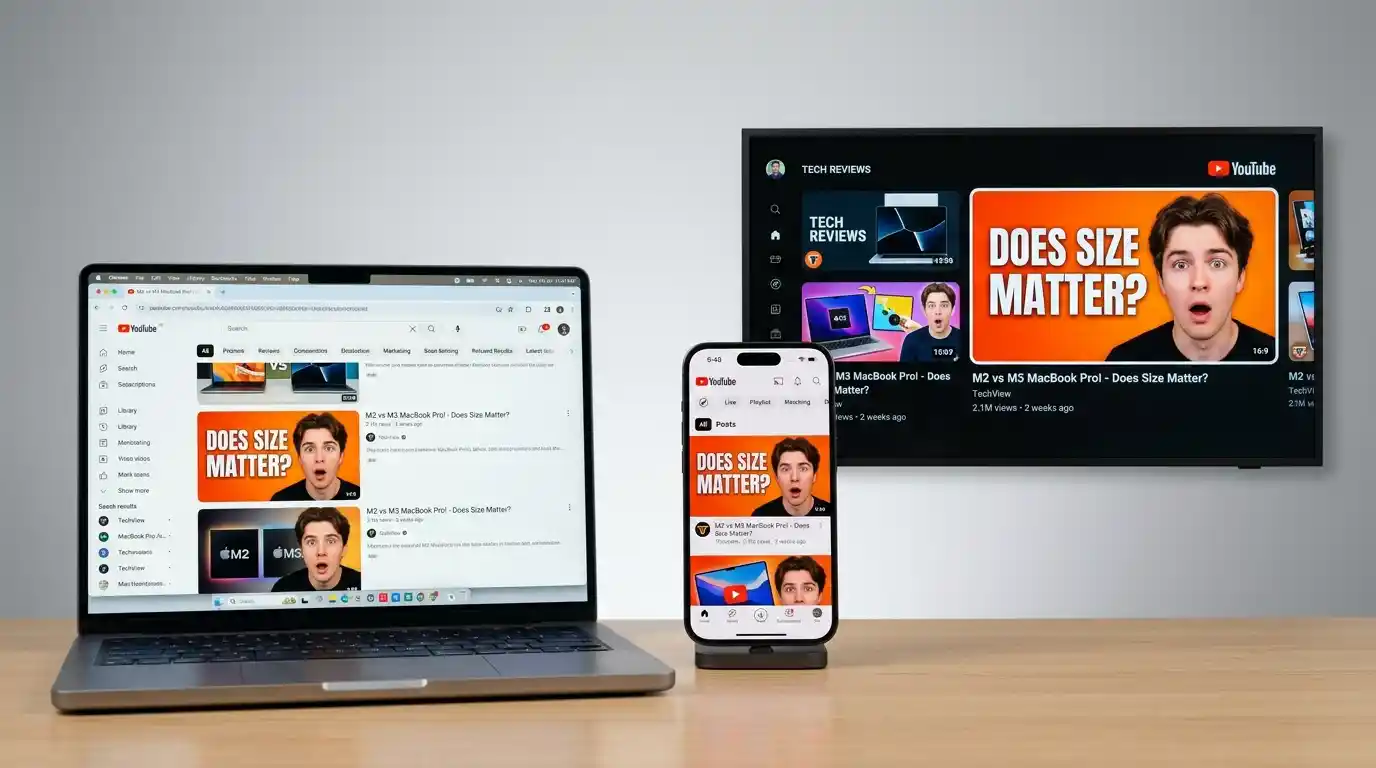
Understanding how YouTube renders thumbnails at different sizes across different contexts is essential for designing thumbnails that remain effective regardless of where they are viewed.
Desktop Display Sizes
On desktop, YouTube thumbnails appear at a variety of rendered sizes depending on the layout context:
- Search results: approximately 360 x 202 pixels
- Suggested/Up Next sidebar: approximately 168 x 94 pixels
- Channel homepage grid: approximately 210 x 118 pixels
- Video page (below player): approximately 246 x 138 pixels
This means your thumbnail must communicate its core message even at small rendered sizes. Text that is readable at full 1280 x 720 resolution must still be legible when compressed down to 168 pixels wide.
Mobile and Tablet Display
Mobile is where the majority of YouTube viewing now happens. On smartphones, thumbnails typically render between 160 and 320 pixels wide, depending on device size and orientation. This makes font size, contrast, and simplicity of composition even more critical. Designs that are cluttered with small text or low-contrast color combinations will completely lose impact on mobile screens.
Always check your thumbnail at a small size before finalizing — zoom out your design to roughly 200 x 112 pixels and evaluate whether the core visual elements still communicate clearly.
Smart TV and Embedded Players
On smart TVs, YouTube thumbnails render much larger — sometimes at 480 x 270 pixels or beyond — because the interface is viewed from a distance. Ironically, this is one context where the thumbnail has more breathing room. Embedded video players on websites also display thumbnails at varying sizes depending on the container width. Your 1280 x 720 master file handles all of these scenarios gracefully as long as the design is clean and high-resolution.
Designing a High-Converting YouTube Thumbnail

Technical compliance is the baseline. Great thumbnail design is a competitive advantage.
Text Overlay Guidelines
Text should be short, bold, and readable at a glance. A maximum of 3 to 6 words is the professional standard for thumbnail text. Use fonts that are thick, high-contrast, and sans-serif for maximum legibility. Add a dark drop shadow, stroke, or semi-transparent background behind text to ensure readability regardless of what appears in the background image. Font size should generally occupy no less than 10% of the thumbnail’s height to remain visible at small render sizes.
Avoid full sentences, questions that are too long, or generic phrases like “Watch This!” that add no informational value. Every word on a thumbnail must earn its place.
Color Psychology and Contrast
Color plays a deep psychological role in viewer perception. High-contrast thumbnails — where the subject pops against the background — consistently outperform low-contrast designs in A/B tests. Bright, saturated colors (red, yellow, orange) naturally draw the human eye and perform well as accent colors. Blue and green are calming, but can blend into YouTube’s red-heavy interface branding.
Consider the visual context: your thumbnail will appear next to other thumbnails in a feed. Designing in a color that contrasts with the typical palette for your niche can help your thumbnail stand out on the page.
Faces, Emotions, and Human Psychology
Decades of psychological research confirm that human faces — particularly those displaying strong, exaggerated emotions — attract attention more powerfully than any other visual element. Surprise, excitement, shock, and curiosity are the highest-performing emotional expressions for YouTube thumbnails. If you or a presenter appears in your content, featuring a clearly visible, expressive face in the thumbnail is one of the most reliable ways to improve CTR.
For reference on research-backed thumbnail performance, YouTube’s own Creator Academy resources at support.google.com/youtube/creators provide official guidance on thumbnail best practices.
Branding Consistency Across Your Channel
Thumbnails should also serve a secondary branding function. Using a consistent color palette, font family, layout style, or recurring visual element (such as a logo bug or a specific background style) across all your thumbnails creates a recognizable “channel aesthetic.” Viewers who discover your content through one video will immediately recognize your thumbnails in their feed, which increases return visits and subscriber loyalty.
Common YouTube Thumbnail Mistakes to Avoid
Using Low-Resolution Images
Uploading a thumbnail at 640 x 360 or sourced from a low-quality screenshot will appear blurry and unprofessional, especially on retina and 4K displays. Always start with a high-resolution source image — ideally, a proper photo taken specifically for thumbnails rather than a grabbed frame from the video.
Overloading the Thumbnail with Text
More words do not mean more information — they mean less clarity. A thumbnail crammed with three different headlines, a subtitle, a logo, and a badge is visually overwhelming. Simplicity wins. One strong visual hook paired with a short, punchy phrase is the formula that consistently outperforms complex layouts.
Ignoring Mobile Optimization
Designing on a large monitor and never previewing at small sizes is one of the most common errors among new creators. Always test your thumbnail at 160 x 90 pixels (roughly what a mobile search result displays) before finalizing. If the key elements are unreadable or indistinguishable at that size, redesign.
Tools to Create and Optimize YouTube Thumbnails
Free Online Image Tools
You do not need expensive software to create professional thumbnails. A wide range of free browser-based tools offer resizing, compression, and format conversion specifically suited to YouTube thumbnail workflows. For resizing, compressing, and converting images quickly, explore Image Tools Free — a clean, fast toolkit that handles all the technical preparation steps without requiring software installation.
Professional Design Software
- Canva — Template-rich web-based tool with YouTube thumbnail presets at 1280 x 720
- Adobe Photoshop — Industry standard for full control over every design element
- Adobe Express — Lighter, faster version of Photoshop with thumbnail templates
- GIMP — Free, open-source alternative to Photoshop with a robust feature set
- Figma — Vector-based UI design tool increasingly used by content creators for thumbnail design
YouTube Thumbnail SEO: The Connection Between Visuals and Rankings
Click-Through Rate (CTR) and Its Impact on the YouTube Algorithm
YouTube’s recommendation algorithm weighs CTR heavily in its decision to distribute a video. A video that earns a 10% CTR in its first 48 hours will receive dramatically more algorithmic promotion than one earning 4%, even if the lower-CTR video has higher watch time or engagement. Because your thumbnail is the primary driver of CTR (alongside the title), it is directly influences your video’s SEO performance within the YouTube ecosystem.
The thumbnail does not contain metadata that search engines index directly, but the behavioral signal it generates (CTR, watch time initiated) is a core ranking factor in YouTube’s internal search algorithm.
A/B Testing Your Thumbnails
YouTube Studio offers a native Test & Compare feature (rolling out globally) that allows creators to test two or three thumbnail variants simultaneously and let the algorithm determine which one earns more clicks. Even without this tool, creators can manually swap thumbnails after a video’s initial launch and compare 48-hour CTR windows to identify which design performs better. A/B testing thumbnails is one of the highest-leverage activities available to a growing YouTube channel.
YouTube Thumbnail Size for Shorts vs. Long-Form Videos
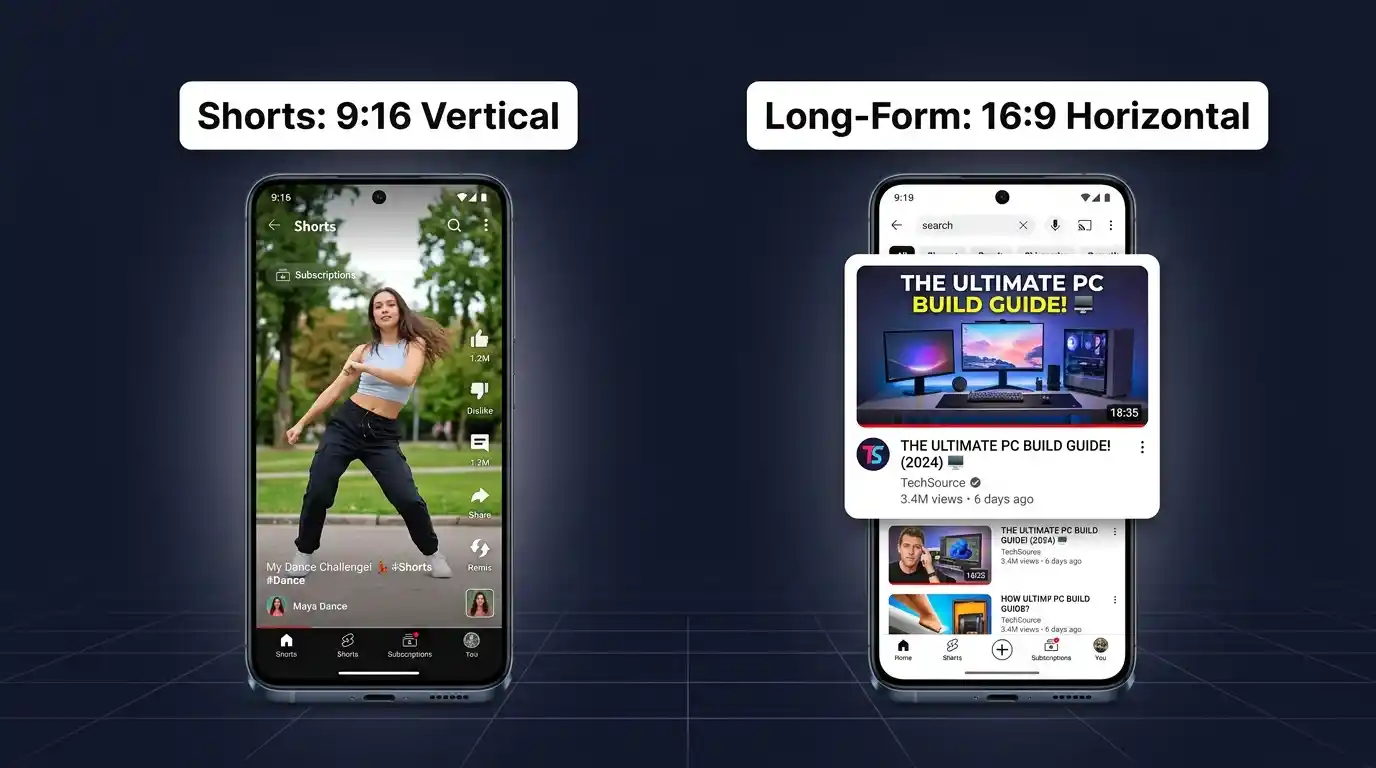
Shorts Thumbnail Dimensions
YouTube Shorts operates in a vertical video format, and while the system still applies the standard 1280 x 720 horizontal thumbnail to Shorts in some display contexts, Shorts are primarily discovered through the Shorts feed, which auto-plays vertically. The effective thumbnail format for Shorts in feed display is vertical (9:16 ratio), mirroring the 1080 x 1920 pixel dimension of the videos themselves.
If your Shorts video has a dedicated thumbnail visible in search or on your channel grid, YouTube will crop the standard 16:9 thumbnail. For this reason, ensure any key visual elements in a Shorts thumbnail are centered so they survive this crop.
Differences in Display Behavior
Long-form videos display their thumbnails prominently across search, home feed, and suggestions — giving the thumbnail maximum surface area for impact. Shorts, by contrast, are largely driven by the algorithm pushing auto-play loops rather than thumbnail-driven clicks. Despite this, maintaining quality thumbnails on Shorts still matters for channel grid aesthetics and search visibility outside the Shorts feed.
Frequently Asked Questions About YouTube Thumbnail Sizes
Q: What is the ideal YouTube thumbnail size? 1280 x 720 pixels at a 16:9 aspect ratio, with a file size under 2 MB.
Q: What file format is best for YouTube thumbnails? JPG for photo-based thumbnails; PNG for designs with sharp text or transparent elements.
Q: Can I upload a 4K thumbnail to YouTube? Yes, but YouTube will compress it. Uploading at 1280 x 720 is sufficient and recommended.
Q: Why is my YouTube thumbnail blurry? Blurry thumbnails are typically caused by uploading below the recommended 1280 x 720 resolution or over-compressing the file.
Q: Does thumbnail design affect YouTube SEO? Indirectly, yes. A better thumbnail raises CTR, which is a strong algorithmic ranking signal on YouTube.