

Summary
Strong Practices for Image Naming in SEO help search engines understand your images before they even read the full page content. A clean image filename can support image search visibility, improve topical relevance, make media libraries easier to manage, and create a better foundation for alt text, captions, compression, and page speed. Image naming is not a magic ranking shortcut, but it is one of the simplest image SEO habits that website owners, bloggers, designers, and eCommerce teams can apply before uploading media to a website.
A poor filename like IMG_20260619_0045.jpg tells Google and users almost nothing. A clear filename like seo-image-naming-best-practices-example.jpg gives immediate context. When image names match the topic of the page, support user intent, and stay clean without keyword stuffing, they become part of a stronger on-page SEO system.
This guide explains how to name images for SEO, how filenames work with alt text and surrounding content, what mistakes to avoid, and how to create repeatable naming rules for blogs, tools, product pages, local business pages, and visual guides.
Table of Content
- Why Practices for Image Naming in SEO Matter
- How Search Engines Understand Image Files
- Core Practices for Image Naming in SEO
- How to Write SEO-Friendly Image File Names
- Image Naming Rules for Different Website Types
- Image Formats, File Size, and Naming Together
- Common Image Naming Mistakes to Avoid
- Image Naming Checklist Before Uploading
- Conclusion
- FAQs
Why Practices for Image Naming in SEO Matter
Image SEO is often treated as an afterthought. Many website owners spend hours writing page titles, meta descriptions, headings, and internal links, but upload images with random camera names or downloaded file names. That is a missed opportunity.
Search engines use several signals to understand an image. These include the image filename, alt text, page title, nearby text, captions, structured data, image sitemap information, and the overall topic of the page. The filename is only one signal, but it is one of the first signals you control before the image is uploaded.
For example, compare these two filenames:
IMG_8392.jpg
best-practices-image-naming-seo.jpg
The second filename is much clearer. It tells search engines and humans that the image is related to SEO image naming. If this image appears inside an article about image file naming, the filename supports the page topic naturally.
Good image naming can help in several ways:
- It gives search engines useful context.
- It improves image organization inside your CMS.
- It supports Google Images visibility.
- It helps content teams avoid duplicate or confusing files.
- It creates a cleaner workflow for blogs, landing pages, and eCommerce images.
- It supports accessibility when used alongside proper alt text.
- It helps developers, editors, and SEO teams understand an image’s purpose quickly.
Image naming alone will not rank a page. A weak article with perfectly named images will still struggle. But when image names support helpful content, fast loading, relevant alt text, and strong page structure, they become part of a complete SEO foundation.
Google Search Central recommends using descriptive filenames, titles, and alt text for images. That means filenames should not be random, vague, or overloaded with repeated keywords. The goal is simple: describe the image clearly and honestly.
How Search Engines Understand Image Files
Search engines cannot rely only on the visual content of an image. Modern systems can interpret images better than before, but search engines still depend heavily on text signals around the image. This is why image SEO is not only about what the image shows. It is also about how the image is described, placed, compressed, and connected to the page topic.
The Filename
The filename is the actual name of the image file, such as:
organic-dog-food-bowl.jpg
This filename gives a clear signal that the image likely shows organic dog food in a bowl. If the page is about organic dog food, the filename fits naturally.
A filename like final-image-1.jpg gives no useful meaning. It may be easy for the designer during editing, but it does not help search engines, content managers, or users who download or inspect the file.
The Alt Text
Alt text describes the image for screen readers and search engines. It should explain the image in a helpful, natural way. For example:
A bowl of organic dog food with vegetables and dry kibble.
Alt text is not the same as the filename. The filename should be short and descriptive. Alt text can be a little more specific because it describes the image for accessibility and context.
The Surrounding Text
Google also looks at the text around the image. If an image appears in a section about WebP compression, the filename, alt text, caption, and paragraph should all support that topic.
For example, if your image is named:
jpg-to-webp-conversion-example.jpg
It makes sense to place it near text explaining how WebP files reduce image size while keeping quality. In that context, you can naturally mention a tool like Convert JPG to WebP Online Free Tool when discussing image format conversion.
Captions and Titles
Captions are visible text near images. They are useful when the image needs extra explanation. Image titles may appear in some contexts, but they are less important than filenames and alt text.
A caption can help users understand why an image is included. For example:
“Example of a clean SEO filename before uploading an image to WordPress.”
Page Relevance
An image about “SVG icons” should appear on a page related to SVGs, graphics, web design, or image formats. If you are explaining scalable vector graphics, you can naturally link readers to What Is SVG Format, A Complete Guide for a deeper explanation of how SVG files work.
Image naming is strongest when the image, filename, alt text, caption, and surrounding content all point in the same direction.
Core Practices for Image Naming in SEO
The best image names are simple, descriptive, and relevant. They tell users and search engines what the file is about without looking spammy or forced.
Use Descriptive Words
A good filename should describe the main subject of the image. Avoid random numbers, camera-generated names, or vague labels.
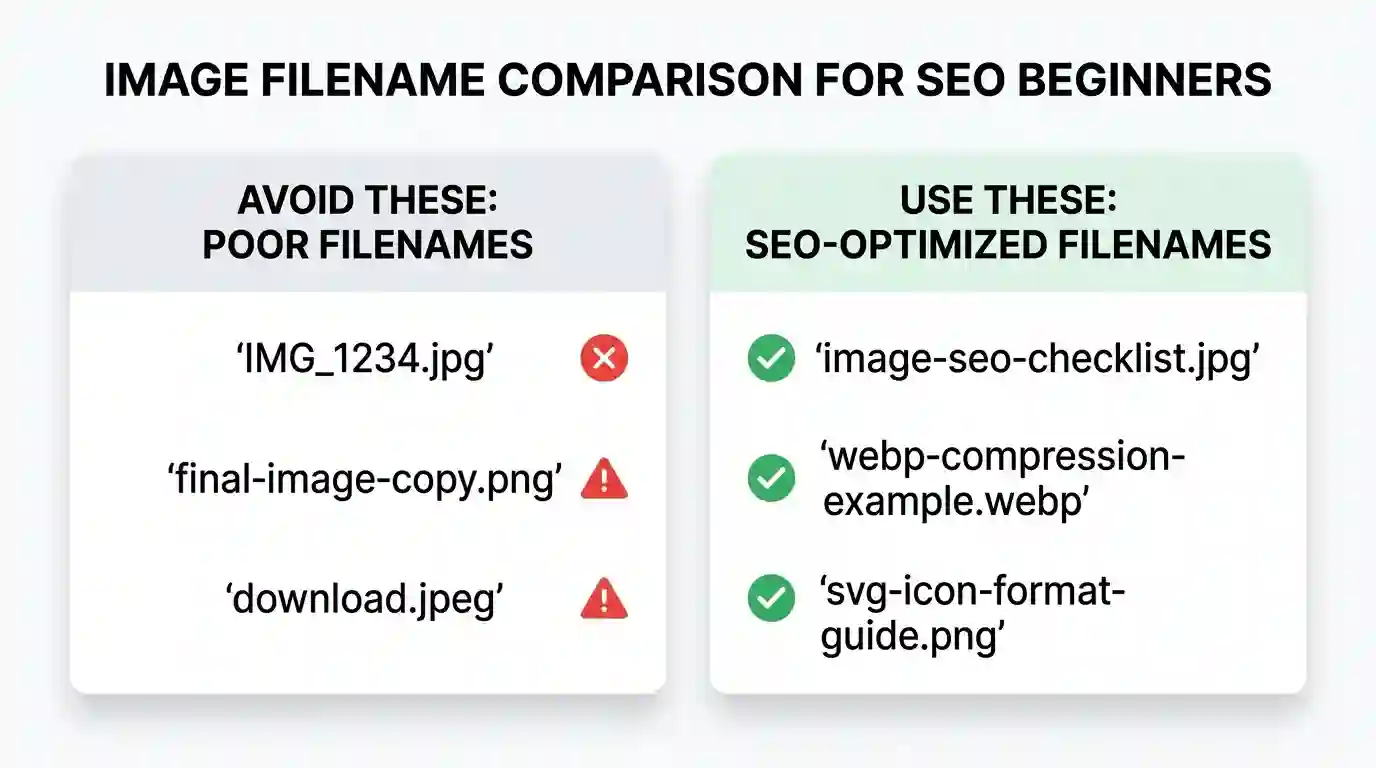
Poor examples:
IMG_1020.jpg
photo-new.jpg
banner-final-final.jpg
download-3.png
Better examples:
image-seo-filename-example.jpg
webp-compression-before-after.jpg
svg-icon-format-example.png
seo-friendly-product-image-name.jpg
Descriptive filenames make your media library easier to manage and help search engines understand the image topic.
Keep Image Names Short but Clear
A filename should not become a full sentence. Aim for short, meaningful phrases.
Good:
image-naming-seo-checklist.jpg
Too long:
complete-guide-about-the-best-practices-for-image-naming-in-seo-for-beginners.jpg
The second example is too heavy. It looks unnatural and may be harder to manage. A good filename usually contains 3 to 7 important words.
Use Hyphens Between Words
Use hyphens instead of spaces or underscores.
Best:
seo-image-naming-guide.jpg
Avoid:
seo_image_naming_guide.jpg
seo image naming guide.jpg
Hyphens make filenames cleaner and easier to read. They are the standard choice for SEO-friendly URLs and image filenames.
Use Lowercase Letters
Lowercase filenames reduce technical issues across different servers, CMS platforms, and file systems.
Use:
image-seo-example.jpg
Avoid:
Image-SEO-Example.JPG
Some systems treat uppercase and lowercase characters differently. Keeping everything lowercase creates consistency.
Include the Main Topic Naturally
The filename should include the topic of the image, not necessarily the exact main keyword, every time.
For this article, useful filenames could include:
image-naming-seo-checklist.jpg
seo-friendly-image-file-name.jpg
image-file-name-example.jpg
webp-image-optimization-example.jpg
You do not need to force the primary keyword into every filename. Natural relevance is better than keyword stuffing.
Match the Image to the Page Topic
A filename should describe the image and support the page. If the page is about image naming, an image showing a file renaming process should have a name like:
image-file-renaming-seo-process.jpg
This filename is clear because it describes both the image and the article topic.
Avoid Stop Words When They Add No Value
Words like “a,” “the,” “and,” “of,” and “for” are sometimes unnecessary in filenames. Removing them can make filenames cleaner.
Instead of:
the-best-way-for-naming-images-in-seo.jpg
Use:
best-image-naming-seo.jpg
Do not remove words if the filename becomes confusing. Clarity matters more than strict trimming.
Make Names Human-Readable
A human should be able to understand the file without opening it. If an editor sees local-roofing-contractor-before-after.jpg, they know what the image likely contains.
This is especially helpful for websites with large media libraries, such as blogs, directories, product stores, real estate sites, food websites, and tool-based websites.
How to Write SEO-Friendly Image File Names
Writing SEO-friendly image names becomes easier when you follow a repeatable process. The goal is not to create clever filenames. The goal is to create accurate filenames.
Step 1: Identify the Main Subject
Ask yourself: What is the image showing?
If the image shows a screenshot of a JPG to WebP converter, the main subject is not just “screenshot.” It is a WebP conversion tool or image format conversion.
A good filename could be:
jpg-to-webp-converter-tool.jpg
Step 2: Connect It to the Page Topic
Next, ask: Why is this image on the page?
If the image is used inside a section about image compression, the filename should reflect that.
Better:
jpg-to-webp-image-compression-example.jpg
This connects the visual to the page topic.
Step 3: Add a Relevant Keyword Carefully
A keyword can help when it fits naturally. But do not repeat the same keyword in every filename.
Good:
image-naming-seo-workflow.jpg
Bad:
practices-for-image-naming-in-seo-image-naming-seo-best-practices-seo.jpg
The bad example looks spammy. It is difficult to read and does not help users.
Step 4: Remove Extra Words
After writing a filename, clean it. Remove words that add no meaning.
Original:
the-best-complete-example-of-image-file-naming-for-seo.jpg
Improved:
image-file-naming-seo-example.jpg
The improved version is shorter and clearer.
Step 5: Use the Right File Extension
The file extension should match the actual image format. Common examples include:
.jpg for photos
.png for transparent graphics or screenshots
.webp for compressed web images
.svg for vector graphics and icons
Do not rename a file extension manually if the file format has not actually changed. For example, changing image.jpg to image.webp does not convert the image. You need to properly convert the file format using software or an online tool.
Step 6: Final Check Before Upload
Before uploading, check:
- Does the filename describe the image?
- Is it lowercase?
- Does it use hyphens?
- Is it short?
- Does it avoid keyword stuffing?
- Does it match the page topic?
- Is the image format correct?
This simple check can prevent many SEO and media management issues.
Image Naming Rules for Different Website Types
Different websites need different image naming systems. A blog does not need the same structure as an e-commerce store. A local service website does not need the same pattern as a SaaS tool website.
Blog Websites
For blog posts, image names should match the article topic and section purpose.
Examples:
image-naming-seo-guide.jpg
alt-text-vs-file-name-example.jpg
webp-image-format-comparison.jpg
svg-format-icon-example.jpg
A blog image should make the article easier to understand. If the image is decorative and does not add meaning, use a simple descriptive filename and avoid over-optimizing it.
Tool Websites
Tool websites often use screenshots, UI previews, icons, and process images. These should be named based on what the user is doing.
Examples:
convert-jpg-to-webp-tool-preview.jpg
image-compression-upload-screen.jpg
webp-download-result-example.jpg
image-format-conversion-interface.jpg
For a tool page, filenames should describe the actual action. This improves clarity for both SEO and internal organization.
eCommerce Websites
Product image naming should include product name, model, color, size, or angle when relevant.
Examples:
black-leather-wallet-front-view.jpg
mens-running-shoes-blue-side-view.jpg
ceramic-coffee-mug-personalized-name.jpg
wireless-keyboard-white-top-view.jpg
For large eCommerce stores, consistent naming is essential. A good pattern might be:
brand-product-name-color-angle.jpg
For example:
nike-air-zoom-black-side-view.jpg
Avoid using only SKU numbers unless the SKU is combined with descriptive words. A filename like SKU-98382.jpg may help internally, but it gives little context to search engines.
Better:
black-running-shoes-sku-98382.jpg
Local Business Websites
Local service businesses can include service and location when the image genuinely relates to that area.
Examples:
roof-repair-darlington-before-after.jpg
water-removal-fort-myers-equipment.jpg
plumber-london-leak-repair.jpg
window-replacement-watford-project.jpg
Do not add a city name to every image if the image has no local connection. If the photo is from a real project in that area, the local term makes sense.
Portfolio Websites
Portfolio websites should name images based on project type, style, client category, or location.
Examples:
modern-kitchen-interior-design.jpg
minimalist-logo-design-concept.jpg
ecommerce-website-homepage-design.jpg
restaurant-branding-menu-design.jpg
A clean portfolio filename helps search engines and potential clients understand the work quickly.
News and Magazine Websites
News images should be clear, factual, and topic-specific.
Examples:
solar-energy-policy-update.jpg
city-council-meeting-june-2026.jpg
football-final-match-celebration.jpg
Avoid misleading filenames. A filename should not suggest something that the image does not show.
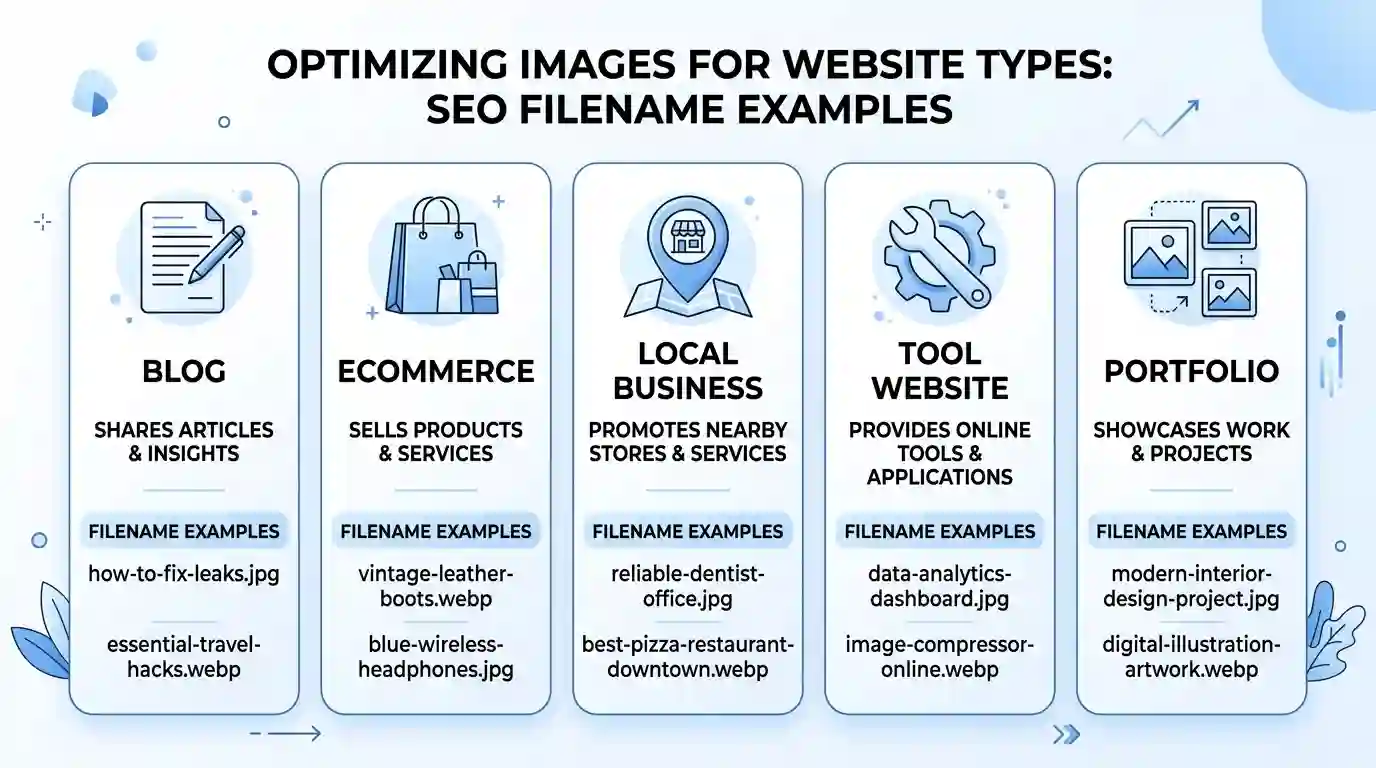
Image Formats, File Size, and Naming Together
Image naming is important, but it should not be separated from image format and file size. A well-named image that loads slowly can still hurt user experience.
Choose the Right Format
Different image formats serve different purposes.
JPG is common for photographs. It supports good quality with reasonable file sizes.
PNG is useful for screenshots, transparent backgrounds, and graphics that need sharper edges.
WebP is a modern image format that often provides smaller file sizes while keeping good quality. If you are uploading large JPG images to a website, converting them to WebP can help reduce page weight. You can use the Convert JPG to WebP Online Free Tool to convert images before uploading them.
SVG is best for logos, icons, and vector graphics because it can scale without losing quality. If you want to understand when SVG is the right choice, read What Is SVG Format, A Complete Guide.
Use Filename and Format Together
The filename and file format should make sense together.
Good examples:
image-seo-checklist.webp
website-logo-svg-format.svg
product-photo-front-view.jpg
tool-interface-screenshot.png
Each example gives both context and format clarity.
Compress Images Before Upload
Large images slow down pages. Slow pages can hurt user experience, increase bounce rate, and reduce conversion rates. Before uploading images, compress them without making them blurry.
A practical workflow is:
- Rename the image.
- Resize it to the correct dimensions.
- Convert it to the right format.
- Compress it.
- Add proper alt text after upload.
- Place it near relevant content.
This workflow helps SEO, speed, accessibility, and content quality.
Do Not Use Huge Images Without Need
Many websites upload images that are much larger than the display size. For example, a blog may upload a 5000px wide image but display it at 900px. This wastes bandwidth.
Use image sizes that match the design. A featured image may need a larger size than a small inline graphic, but every image should have a purpose.
Keep File Names Consistent After Conversion
If you convert an image from JPG to WebP, keep the descriptive part of the filename.
Before:
image-naming-seo-guide.jpg
After:
image-naming-seo-guide.webp
Do not convert and rename it to something vague like:
converted-file.webp
That loses the SEO value of the original filename.
Common Image Naming Mistakes to Avoid
Even small mistakes can create messy media libraries and weak image SEO signals. Here are the most common problems.
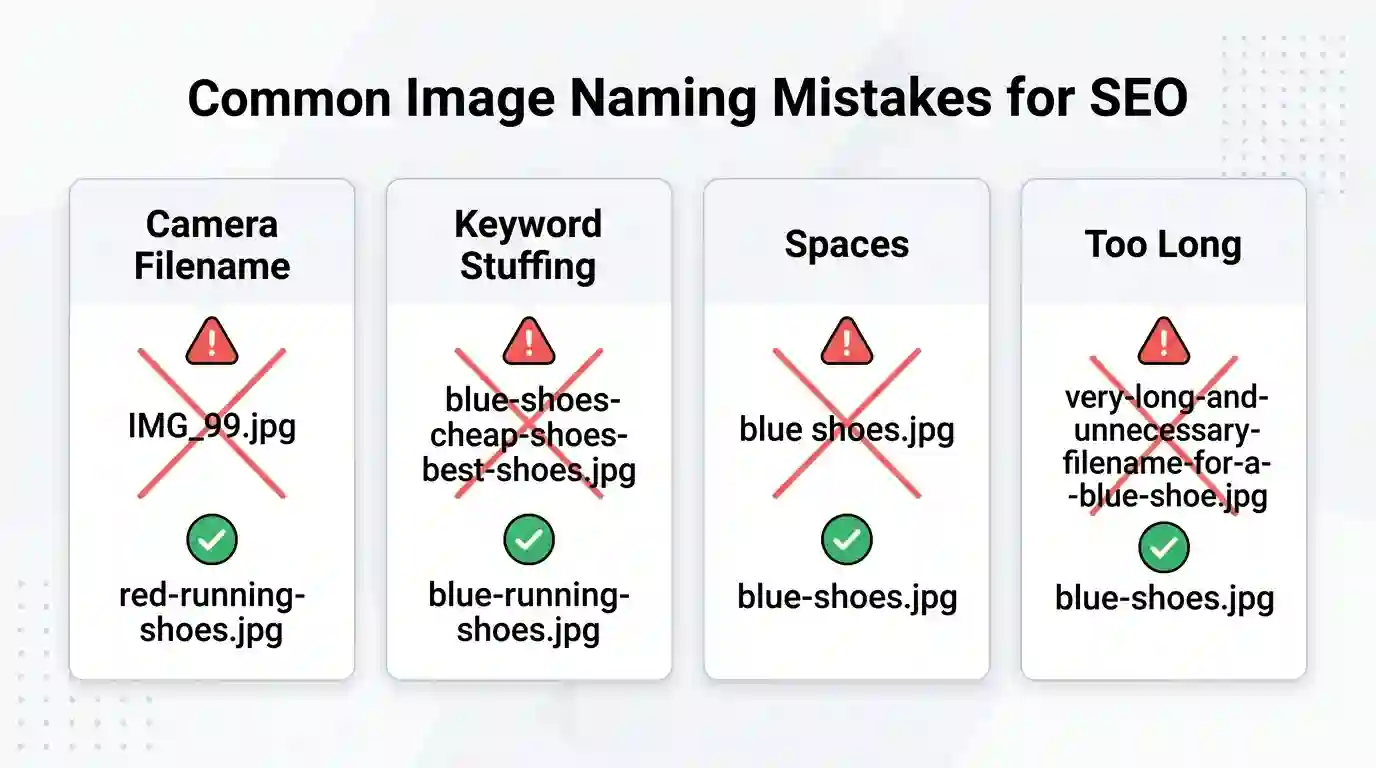
Using Camera-Generated File Names
Names like DSC_0045.jpg or IMG_9001.jpg are common, but they do not describe the image. Always rename images before uploading.
Keyword Stuffing
Keyword stuffing makes filenames look spammy.
Bad:
image-seo-image-seo-best-image-seo-naming-seo.jpg
Better:
image-seo-naming-example.jpg
A filename should be descriptive, not repetitive.
Using Spaces in File Names
Spaces can create messy URLs with %20 in them.
Avoid:
image naming seo guide.jpg
Use:
image-naming-seo-guide.jpg
Using Underscores Instead of Hyphens
Underscores are harder to read in URLs and filenames.
Avoid:
image_naming_seo_guide.jpg
Use:
image-naming-seo-guide.jpg
Making File Names Too Long
Long filenames are hard to manage and can look unnatural.
Avoid:
complete-best-practices-for-image-naming-in-seo-full-step-by-step-guide-for-beginners.jpg
Use:
image-naming-seo-guide.jpg
Reusing the Same Filename for Many Images
If multiple images have almost the same filename, your media library becomes confusing.
Instead of:
seo-image.jpg
seo-image-1.jpg
seo-image-2.jpg
Use:
seo-image-filename-example.jpg
seo-image-alt-text-example.jpg
seo-image-compression-example.jpg
Each filename should describe the unique purpose of the image.
Naming Images After Irrelevant Keywords
Do not name an image after a keyword just because you want to rank for it. If the image does not show the topic, the filename is misleading.
For example, do not name a random office image:
best-free-image-converter-tool.jpg
unless the image actually relates to an image converter tool.
Forgetting to Rename Downloaded Stock Images
Stock images often come with generic filenames. Rename them based on their use in your article.
Stock filename:
pexels-photo-839482.jpeg
Better:
seo-content-team-image-optimization.jpg
Make sure the filename describes the way the image is used on the page.
Changing Image Names After Publishing Without Redirects
If an image is already indexed and used on a live page, changing the filename changes the image URL. That may break links or cause search engines to treat it as a new image.
It is best to name images properly before uploading. If you must change filenames later, check whether your CMS updates image URLs correctly and whether redirects are needed.
Advanced Tips for Better Image SEO
Once your basic naming system is clean, you can improve your image SEO further with a few advanced habits.
Build a Naming Template
A naming template helps teams stay consistent.
For blog images:
topic-section-purpose.format
Example:
image-seo-filename-checklist.webp
For product images:
product-name-color-angle.format
Example:
leather-wallet-brown-front-view.jpg
For local services:
service-location-project-type.format
Example:
roof-repair-darlington-before-after.jpg
For tool pages:
tool-action-screen-format.format
Example:
jpg-to-webp-upload-screen.webp
Templates reduce confusion and make training easier for content teams.
Add Image Names to Your Content SOP
If you have writers, designers, or VAs uploading content, include image naming in your standard operating procedure.
Your SOP should explain:
- How to rename images before upload.
- Which words to include.
- Which words to avoid?
- Which format to use?
- How to write alt text.
- How to compress images.
- Where to place images inside content.
This prevents SEO problems before they happen.
Use Image Sitemaps When Needed
Large websites, especially e-commerce stores and image-heavy platforms, may benefit from image sitemap support. Image sitemaps help search engines discover images that may not be easy to find through normal crawling.
For smaller blogs, a well-structured page and clean internal linking may be enough. For larger websites, technical image SEO becomes more important.
Use Structured Data Where Relevant
Structured data can help search engines understand pages more clearly. For recipes, products, articles, and videos, structured data may include image fields. Make sure the image URL used in structured data points to a relevant, high-quality image.
Keep Images Near Relevant Text
Do not place images randomly. If an image shows an example of filename optimization, place it near the section explaining filename optimization.
This helps users and search engines connect the image to the surrounding topic.
Use Original Images When Possible
Original screenshots, diagrams, product photos, and custom graphics often provide more value than generic stock images. Original visuals can make your content more helpful and harder to copy.
For example, a custom screenshot showing a real image renaming workflow is more useful than a generic laptop photo.
Think About Google Images Search Intent
People search Google Images for examples, diagrams, templates, comparisons, products, locations, and visual instructions. If your image answers a visual search need, it has a better chance of attracting attention.
For this article, useful image ideas include:
- Image filename examples
- Bad vs good naming comparison
- Image SEO checklist
- JPG vs WebP comparison
- Alt text and filename difference
- Image upload workflow
A good image should support the reader, not just decorate the page.
Image Naming Checklist Before Uploading
Use this checklist before adding any image to your website.
Basic Filename Checklist
- Is the filename descriptive?
- Does it describe the actual image?
- Is it relevant to the page topic?
- Is it lowercase?
- Does it use hyphens between words?
- Is it short and clean?
- Does it avoid keyword stuffing?
- Does it avoid spaces and special characters?
- Is the file extension correct?
- Is the image compressed?
SEO Context Checklist
- Is the image placed near relevant content?
- Does the alt text describe the image naturally?
- Does the caption add value if needed?
- Does the image support search intent?
- Does the page topic match the image?
- Is the image original or useful?
- Is the image size suitable for the page?
- Is the image format appropriate?
Example Before and After
Poor workflow:
Upload IMG_4567.jpg directly to WordPress.
Add no alt text.
Place it randomly in the article.
Use a 4MB file size.
Better workflow:
Rename it to image-naming-seo-checklist.webp.
Compress the file.
Upload it to the article.
Add helpful alt text.
Place it inside the checklist section.
This improved workflow gives search engines a clearer context and gives users a better experience.
Real Examples of Good Image Names
Here are practical filename examples for different scenarios.
SEO Blog Examples
image-naming-seo-guide.webp
seo-friendly-image-file-name.jpg
alt-text-vs-image-filename.png
image-seo-checklist-example.webp
Image Tool Examples
jpg-to-webp-converter-preview.webp
image-resizer-upload-screen.png
webp-download-button-example.jpg
online-image-compression-tool.webp
SVG Article Examples
svg-format-vector-example.svg
svg-vs-png-comparison.png
responsive-svg-icon-example.svg
scalable-vector-graphic-guide.png
Product Page Examples
black-ceramic-coffee-mug-front.jpg
wireless-mouse-white-side-view.jpg
cotton-tshirt-navy-size-large.jpg
wooden-dining-table-top-view.jpg
Local SEO Examples
emergency-plumber-london-van.jpg
roof-repair-darlington-project.jpg
water-removal-fort-myers-team.jpg
window-glass-replacement-watford.jpg
These examples are clean, readable, and topic-specific.
How Image Naming Works With Alt Text
A common mistake is thinking the filename and alt text should be the same. They should support each other, but they do not need to match exactly.
Filename:
image-naming-seo-checklist.jpg
Alt text:
Checklist showing how to create SEO-friendly image filenames before uploading them to a website.
The filename is short. The alt text is more descriptive. Together, they provide a stronger signal.
Filename vs Alt Text
Filename answers:
“What is this file about?”
Alt text answers:
“What does this image show, and what should a screen reader communicate?”
Caption answers:
“Why is this image useful in this section?”
Surrounding text answers:
“How does this image support the topic being discussed?”
When all four are aligned, image SEO becomes much stronger.
How to Rename Existing Images on a Website
If your site already has many poorly named images, do not rush to rename everything without planning. Changing image filenames may change image URLs, which can affect indexed images and page rendering.
When You Should Rename Existing Images
Renaming may be useful when:
- The image is important for SEO.
- The image appears on a high-value page.
- The filename is completely meaningless.
- The page is being updated anyway.
- You can update internal references properly.
When You Should Leave Images Alone
You may leave images unchanged when:
- The image is old and not important.
- The page gets little traffic.
- The filename change may break image URLs.
- You cannot manage redirects.
- The image is decorative.
Best Approach for Existing Sites
Start with your most important pages. These may include:
- Homepage
- Main service pages
- Product category pages
- High-traffic blog posts
- Tool pages
- Landing pages
- Pages already ranking on Google
Update images carefully. Make sure the image still loads after renaming. If the image URL changes, check whether your CMS handles it properly.
Conclusion
Image naming is a small task with long-term SEO value. It helps search engines understand your visuals, keeps your media library organized, supports accessibility workflows, and improves the overall quality of your on-page SEO.
The best approach is simple. Use short, descriptive, lowercase filenames with hyphens. Describe the image honestly. Include relevant keywords only when they fit naturally. Avoid camera-generated names, keyword stuffing, spaces, underscores, and overly long filenames.
Strong image SEO does not stop at the filename. You also need useful alt text, relevant surrounding content, proper image formats, compression, and smart placement. When these elements work together, your images become clearer for users and easier for search engines to understand.
If you build these habits into your publishing workflow, every blog post, tool page, product page, and landing page will have cleaner visual SEO from the start.
FAQs
What is the best way to name images for SEO?
The best way is to use short, descriptive filenames that explain what the image shows. Use lowercase letters, separate words with hyphens, and include a relevant keyword only when it fits naturally. For example, image-naming-seo-checklist.jpg is better than IMG_4500.jpg.
Should image filenames include keywords?
Yes, but only when the keyword is relevant to the image. Do not force keywords into every filename. A natural filename is better than a stuffed one. For example, webp-image-compression-example.webp is useful if the image shows WebP compression.
Are hyphens better than underscores in image names?
Yes. Hyphens are usually preferred because they make filenames easier to read and are commonly used in SEO-friendly URLs. Use seo-image-example.jpg instead of seo_image_example.jpg.
How long should an SEO image filename be?
An SEO image filename should usually be short, clear, and descriptive. A good range is often 3 to 7 important words. Avoid long filenames that look like full sentences.
Should I rename images before uploading them to WordPress?
Yes. It is better to rename images before uploading them. This keeps the image URL clean from the start and avoids problems later if the image is already indexed or used across the site.
Can image names help images rank in Google Images?
Image names can help Google understand the image, but they are only one part of image SEO. Alt text, page content, captions, image quality, page relevance, and technical SEO also matter.
Is alt text more important than the image filename?
Alt text is usually more important for accessibility and image context, but the filename still matters. The best approach is to use both properly. The filename should be short and descriptive, while alt text should explain the image naturally.
Should I use the exact blog keyword in every image filename?
No. That can look spammy. Use different descriptive filenames based on what each image actually shows. Keyword variety and natural relevance are better than repetition.
What file format is best for SEO images?
There is no single best format for every image. JPG is good for photos, PNG is good for screenshots and transparency, WebP is useful for smaller file sizes, and SVG is ideal for icons and vector graphics.
Can I rename old images already published on my website?
Yes, but be careful. Renaming an image can change its URL. If the image is already indexed or used on important pages, make sure the new URL works and old references are updated properly.