

Summary
How EXIF Data Affects Images is an important topic for photographers, bloggers, website owners, designers, and anyone who uploads images online. EXIF data is the hidden metadata stored inside many image files. It can include camera settings, date and time, device model, lens details, GPS location, orientation, exposure, ISO, aperture, shutter speed, and sometimes software editing history.
This information can be useful for organizing photos, improving photography, proving ownership, and understanding how an image was captured. However, EXIF data can also affect image privacy, file size, website speed, image optimization, search engine performance, and online security. When images are uploaded to blogs, e-commerce stores, portfolios, social media, or business websites, knowing how EXIF metadata works helps you decide whether to keep it, edit it, or remove it before publishing.
Table of Contents
- What Is EXIF Data in Images?
- How EXIF Data Affects Images and Their File Information
- How EXIF Data Affects Images in SEO and Website Speed
- Common Types of EXIF Metadata
- Does EXIF Data Affect Image Quality?
- EXIF Data and Image File Size
- EXIF Data and Privacy Risks
- EXIF Data for Photographers and Creators
- EXIF Data in Blogging, E-commerce, and Web Design
- Should You Remove EXIF Data Before Uploading Images?
- Best Practices for Managing EXIF Data
- Conclusion
- FAQs
What Is EXIF Data in Images?
EXIF stands for Exchangeable Image File Format. It is a type of metadata that is saved inside image files, especially photos taken with digital cameras and smartphones. Metadata simply means “data about data.” In this case, EXIF data is information about the image.
When you take a photo, your camera or phone does not only capture the visible picture. It also records technical details about how that picture was taken. These details may include the camera model, lens type, shutter speed, aperture, ISO value, focal length, date, time, flash status, white balance, image orientation, and sometimes GPS coordinates.
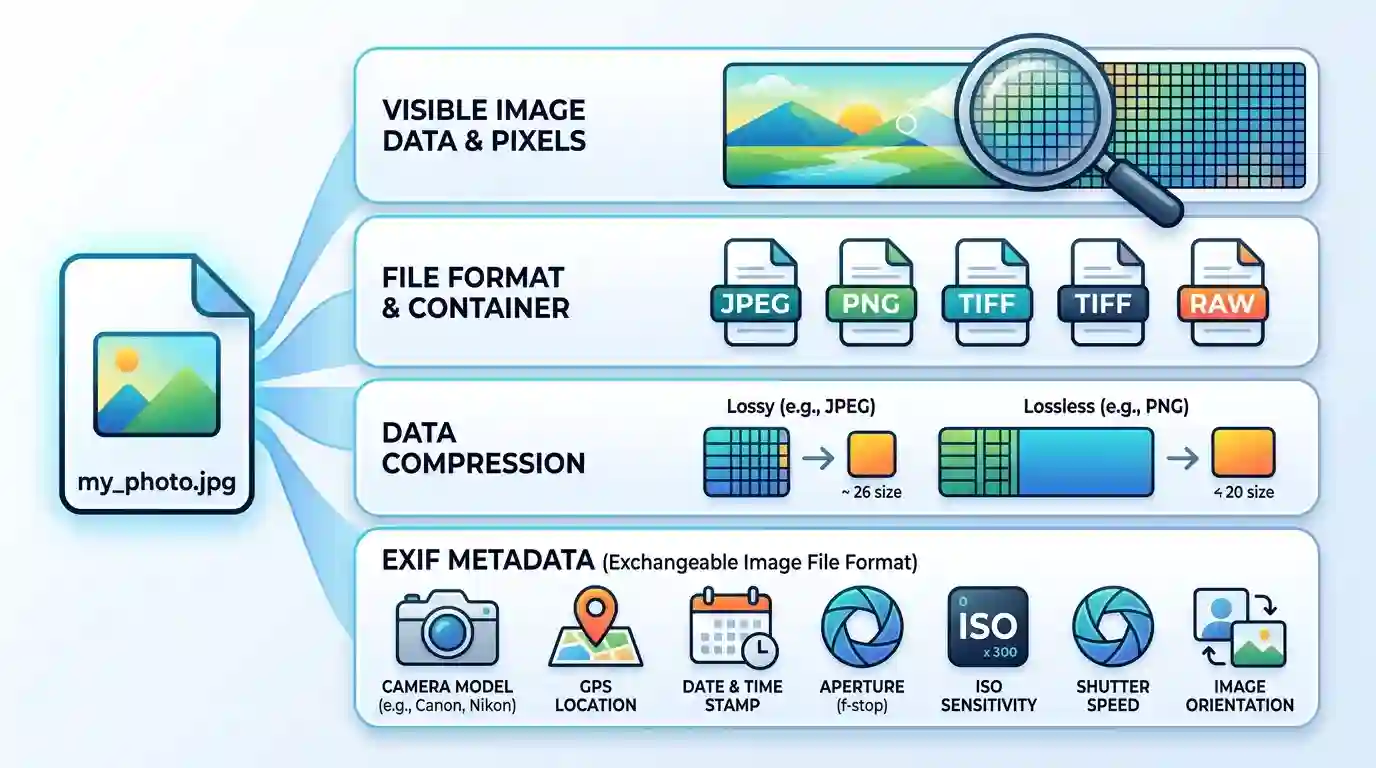
For example, a photo may visually show a mountain landscape, but its EXIF metadata may reveal that it was taken with an iPhone, at 4:35 PM, with a specific focal length, in portrait mode, at a certain latitude and longitude.
EXIF data is commonly found in JPEG and TIFF files. Some other formats may store metadata differently. For most regular users, EXIF data stays hidden unless they open the image properties, use an EXIF viewer, or upload it into a tool that reads metadata.
For website owners and bloggers, EXIF data matters because images are not only visual assets. They are also technical files that affect performance, privacy, storage, and optimization. If you regularly upload images to your website, you should understand what information those images carry.
To optimize image files before publishing, you can use Free Tools for Image Optimization and prepare cleaner, faster, web-friendly images.
How EXIF Data Affects Images and Their File Information
EXIF data affects images by adding hidden information inside the file. This information does not usually change how the image looks on the screen, but it changes what the file contains.
A normal image file may include three main layers of information:
- The visible image pixels
- Compression and format data
- Metadata such as EXIF, IPTC, XMP, or color profile information
The visible pixels are what users see. EXIF data is what software, cameras, operating systems, search tools, editing programs, and some online platforms can read.
EXIF Data Helps Identify Image Details
One major benefit of EXIF metadata is identification. It helps you know when, where, and how an image was created. This is useful for photographers, agencies, journalists, real estate businesses, travel bloggers, and product photographers.
For example, if you have hundreds of photos from a product shoot, EXIF metadata can help you sort them by camera, lens, date, or exposure setting. If you manage a blog with many image files, metadata may help you track the original source or editing software.
EXIF Data Can Help With Image Organization
Photo management tools often use EXIF data to organize image libraries. They can sort photos by date taken, camera model, lens, location, or file information. This makes EXIF useful for large media libraries.
For example, a photographer can search for all photos taken with a 50mm lens or all images captured during a specific date range. Without metadata, the same task would require manual file naming or folder organization.
EXIF Data Can Reveal Hidden Information
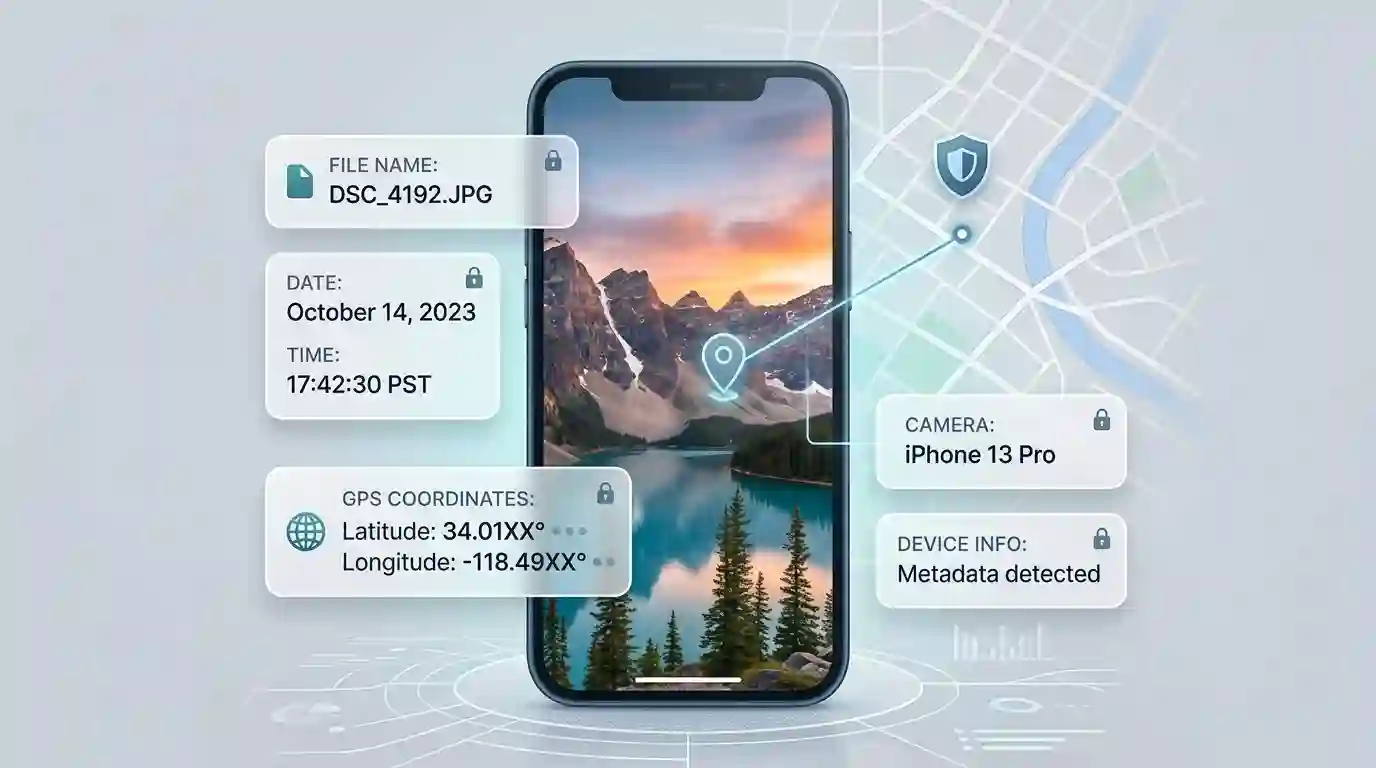
The same feature that makes EXIF useful can also create risk. EXIF metadata can reveal details that users did not intend to share. A photo uploaded online may include GPS coordinates, device details, or the original date and time.
This is why EXIF data should be reviewed before uploading personal, sensitive, or location-based images online.
How EXIF Data Affects Images in SEO and Website Speed
EXIF data can indirectly affect SEO because images affect page speed, user experience, accessibility, and content quality. Search engines care about fast-loading pages, helpful content, image relevance, and technical optimization. EXIF metadata is not usually the main ranking factor, but it can influence image performance and optimization decisions.
EXIF Data and Page Speed
Every extra piece of data inside an image increases the file size slightly. In one image, this may not matter much. But on a website with dozens or hundreds of images, unnecessary metadata can add extra weight.
Large image files can slow down page loading. Slow pages may increase bounce rate and reduce user satisfaction. For SEO, faster pages often create a better user experience, especially on mobile devices.
Removing unnecessary EXIF metadata is one small part of image optimization. Other important steps include compressing images, resizing dimensions, using WebP where suitable, adding descriptive alt text, and choosing the right file format.
EXIF Data and Image Search
EXIF data can help some tools understand technical image details, but website SEO depends more on visible and indexable signals, such as:
- Image file name
- Alt text
- Surrounding content
- Caption
- Page topic
- Structured data
- Image dimensions
- Loading performance
- Relevance to search intent
For example, an image named camera-exif-data-example.jpg with helpful alt text and relevant surrounding content is more SEO-friendly than a random file name like IMG_8842.jpg, even if both contain EXIF metadata.
EXIF Data and Image Optimization Workflow
When publishing images on a blog, it is usually better to optimize them before uploading. This means checking dimensions, file size, compression, format, and metadata. You do not always need to remove every piece of metadata, but you should know what is inside the image.
Image optimization is not just about making images smaller. It is about balancing quality, speed, privacy, and usability.
If you want to understand another important image concept, read Difference Between DPI and Pixels. It explains how image resolution, print quality, and screen display are different from each other.
Common Types of EXIF Metadata
EXIF data can include many fields depending on the camera, phone, software, and image format. Not every image contains the same metadata. Some files have detailed EXIF tags, while others have very little or none.
Camera and Device Information
EXIF data may show the camera brand, camera model, smartphone model, lens model, and firmware version. This helps photographers review their gear performance and helps editors understand how an image was captured.
Examples include:
- Camera manufacturer
- Camera model
- Lens model
- Software version
- Firmware details
This information can be useful in photography communities, stock photography, and professional image management.
Date and Time Information
Many images include the date and time when the photo was taken. This helps organize photos chronologically. It can also be important for documentation, travel photography, event coverage, and journalism.
However, date and time metadata can also reveal personal routines or private timelines. If someone uploads a personal photo online, EXIF data may show exactly when it was captured.
GPS and Location Data
Some smartphones and cameras store GPS coordinates in EXIF metadata. This is called geotagging. It can show where a photo was taken.
GPS metadata can be helpful for travel blogs, mapping, field research, real estate, outdoor photography, and location-based documentation. But it can also expose private locations such as a home, school, workplace, or private event venue.
This is one of the biggest privacy concerns connected with EXIF data.
Camera Settings
EXIF data often includes technical camera settings such as:
- Shutter speed
- Aperture
- ISO
- Exposure compensation
- Focal length
- Flash status
- Metering mode
- White balance
- Exposure mode
These settings are valuable for photographers because they explain how a photo was captured. A beginner can study EXIF data from high-quality images to understand what settings were used in different lighting conditions.
Orientation Data
Many cameras and smartphones store image orientation in EXIF metadata. This tells software whether the image should be displayed vertically or horizontally.
Sometimes, if the orientation tag is not read correctly, an image may appear sideways or upside down on some platforms. This is why image orientation issues can happen even when the image looks correct on your own device.
Editing Software Information
Some images include metadata showing which software was used to edit or export the file. For example, an image may contain information from Photoshop, Lightroom, Canva, or another editing tool.
This can help with workflow tracking, but it may also reveal more information than a publisher wants to share.
Does EXIF Data Affect Image Quality?
EXIF data does not usually affect the visual quality of an image. Removing EXIF metadata does not remove pixels, reduce sharpness, change colors, or damage the visible photo if done correctly.
Image quality is mainly affected by:
- Image resolution
- Pixel dimensions
- Compression level
- File format
- Editing process
- Color profile
- Resizing method
- Export settings
EXIF metadata is separate from the visible image content. It is stored as information inside the file, not as part of the actual photo pixels.
Removing EXIF Does Not Mean Reducing Quality
Many people think removing metadata will make an image blurry or low quality. This is not true when metadata is removed properly. A clean image can look exactly the same after EXIF removal.
For example, if you remove GPS coordinates, camera model, and shutter speed from a JPEG image, the visible image can remain unchanged. The file simply carries less hidden information.
Compression Is Different From Metadata Removal
Compression reduces file size by changing how image data is stored. Depending on the compression type and level, it may affect quality.
Metadata removal is different. It removes hidden information, not visual details. However, some tools combine metadata removal with compression. In that case, quality changes may come from compression, not from EXIF removal itself.
Color Profiles Are Important
While EXIF data may not affect quality, color profiles can affect how an image appears on different devices. Color profile metadata helps software display colors more accurately.
If you remove all metadata without understanding what you are removing, you may accidentally strip useful color information. For web use, sRGB is commonly preferred because it displays consistently across many browsers and devices.
EXIF Data and Image File Size
EXIF data can increase file size, but the amount depends on how much metadata is stored. A simple photo may only have a small amount of metadata, while a file with GPS data, editing history, thumbnails, camera settings, and extended metadata may be larger.
Small Metadata Can Add Up
One image with EXIF data may only be slightly bigger. But a blog post with 20 images, a portfolio with 500 images, or an e-commerce store with thousands of product images can accumulate unnecessary file weight.
For large websites, every kilobyte matters. Faster images help improve user experience, especially for mobile visitors and users with slower internet connections.
EXIF Thumbnails Can Increase Size
Some images include embedded thumbnails inside the metadata. These thumbnails are small preview versions of the image. They can be useful for software previews, but they may not be needed for web publishing.
Removing unnecessary embedded thumbnails can reduce image file size.
Image Optimization Should Be Balanced
The goal is not always to remove everything. The goal is to keep what is useful and remove what is unnecessary. For example, a professional photographer may want to keep copyright information but remove GPS location data. A blogger may remove most metadata to improve privacy and performance.
For web images, a good optimization workflow includes:
- Resize images to the correct display dimensions
- Compress images carefully
- Use modern formats when suitable
- Remove unnecessary metadata
- Keep important copyright or credit information if needed
- Add SEO-friendly file names and alt text
- Test page speed after upload
EXIF Data and Privacy Risks
Privacy is one of the biggest reasons people care about EXIF data. Many users upload photos without realizing that the image may contain hidden personal information.
GPS Location Can Expose Private Places
If location services are enabled on a smartphone camera, the photo may store GPS coordinates. When uploaded publicly, this data can reveal where the image was taken.
This can be risky when sharing photos from:
- Home
- Office
- School
- Private events
- Client locations
- Children’s activities
- Sensitive business sites
- Travel routes
For public blogging or social media, it is usually safer to remove GPS metadata unless location information is intentionally needed.
Device Details Can Reveal Personal Information
EXIF data may show the phone model or camera model used to take the image. This is not always dangerous, but some people prefer not to share device details publicly.
For businesses, device metadata may also reveal internal production processes, editing tools, or workflow details.
Date and Time Can Reveal Patterns
A photo timestamp can show when an image was captured. If many photos are uploaded with full date and time metadata, they may reveal patterns about someone’s schedule, travel, or activity.
This matters for personal safety, journalism, legal documentation, and professional privacy.
Social Media May Remove EXIF Data
Many social media platforms strip some metadata from uploaded images. However, you should not rely on every platform to remove all sensitive metadata. Different websites handle EXIF differently.
The safest approach is to check and remove sensitive metadata yourself before uploading images publicly.
EXIF Data for Photographers and Creators
For photographers, EXIF data is extremely useful. It acts like a technical memory of every shot. Instead of guessing which settings worked, photographers can review actual camera data.

Learning From Camera Settings
EXIF metadata helps photographers improve their skills. By checking shutter speed, aperture, ISO, focal length, and exposure settings, they can understand why an image looked bright, dark, sharp, blurry, warm, or cool.
For example, if a photo has motion blur, the EXIF data may show that the shutter speed was too slow. If a photo has too much noise, the ISO may have been too high.
Professional Workflow and Image Review
In professional photography, EXIF data can help with editing, sorting, and client delivery. Photographers can filter images based on camera body, lens, date, or settings.
This is useful in:
- Wedding photography
- Wildlife photography
- Product photography
- Real estate photography
- Sports photography
- Event photography
- Travel photography
Copyright and Ownership Information
Some creators use metadata to store copyright notices, creator names, contact information, or licensing details. This can help with attribution and asset management.
However, EXIF copyright fields should not be the only method of protecting ownership. Metadata can be removed, edited, or lost when files are uploaded to certain platforms.
Stock Photography and Agencies
Stock photo platforms may read metadata to understand image details, keywords, copyright information, and creator data. Clean and accurate metadata can support a professional submission process.
Still, every platform has its own rules, so photographers should follow the metadata guidelines of the marketplace they use.
EXIF Data in Blogging, E-commerce, and Web Design
For bloggers, e-commerce sellers, and website owners, EXIF data should be handled carefully. Images are important for engagement, conversions, branding, and SEO, but unoptimized images can slow down a website.
Blog Images
Blog images should be clear, relevant, compressed, and properly named. EXIF metadata is usually less important for readers than the visible image quality and content relevance.
For blog publishing, it is often a good idea to remove unnecessary EXIF metadata while keeping the image visually sharp. This helps reduce file weight and avoids sharing hidden private information.
E-commerce Product Images
E-commerce product images should load fast and look professional. Customers care about clarity, angles, color accuracy, and trust. They do not usually need to see camera metadata.
For e-commerce stores, removing unnecessary metadata can help keep image files lighter. This is especially helpful when a product page has multiple images, thumbnails, zoom views, and variation photos.
Portfolio Websites
Portfolio websites may benefit from selected metadata if the creator wants to show camera settings or technical details. For example, a photography portfolio may display camera model, lens, and exposure settings to attract photography clients.
However, if the portfolio includes private client locations or sensitive shoots, GPS metadata should be removed.
Real Estate and Local Business Images
Real estate images often involve location. If the property is publicly listed, location information may already be available. But private client homes, staging photos, or internal business images should be checked carefully.
Local business websites should also avoid uploading images that expose unnecessary private metadata.
Should You Remove EXIF Data Before Uploading Images?
In many cases, yes, you should remove unnecessary EXIF data before uploading images to a public website. But the best choice depends on the purpose of the image.
Remove EXIF Data When Privacy Matters
You should remove EXIF data if the image contains GPS coordinates, private timestamps, personal device details, or sensitive location information.
This is especially important for:
- Personal photos
- Family images
- Children’s photos
- Private home images
- Client work
- Workplace images
- Sensitive travel photos
- Legal or confidential documents
Keep Some Metadata When It Adds Value
You may want to keep certain metadata if it supports your professional workflow. For example, photographers may keep copyright information, creator name, or camera details for portfolio and licensing purposes.
Businesses may keep selected metadata for digital asset management, internal archives, or legal documentation.
Remove Unnecessary Metadata for Website Speed
If your main goal is web performance, removing unnecessary metadata can be helpful. It should be combined with image compression, resizing, lazy loading, and modern image formats.
A faster image is not only good for SEO. It also improves user experience, mobile browsing, and conversion rates.
Best Practices for Managing EXIF Data
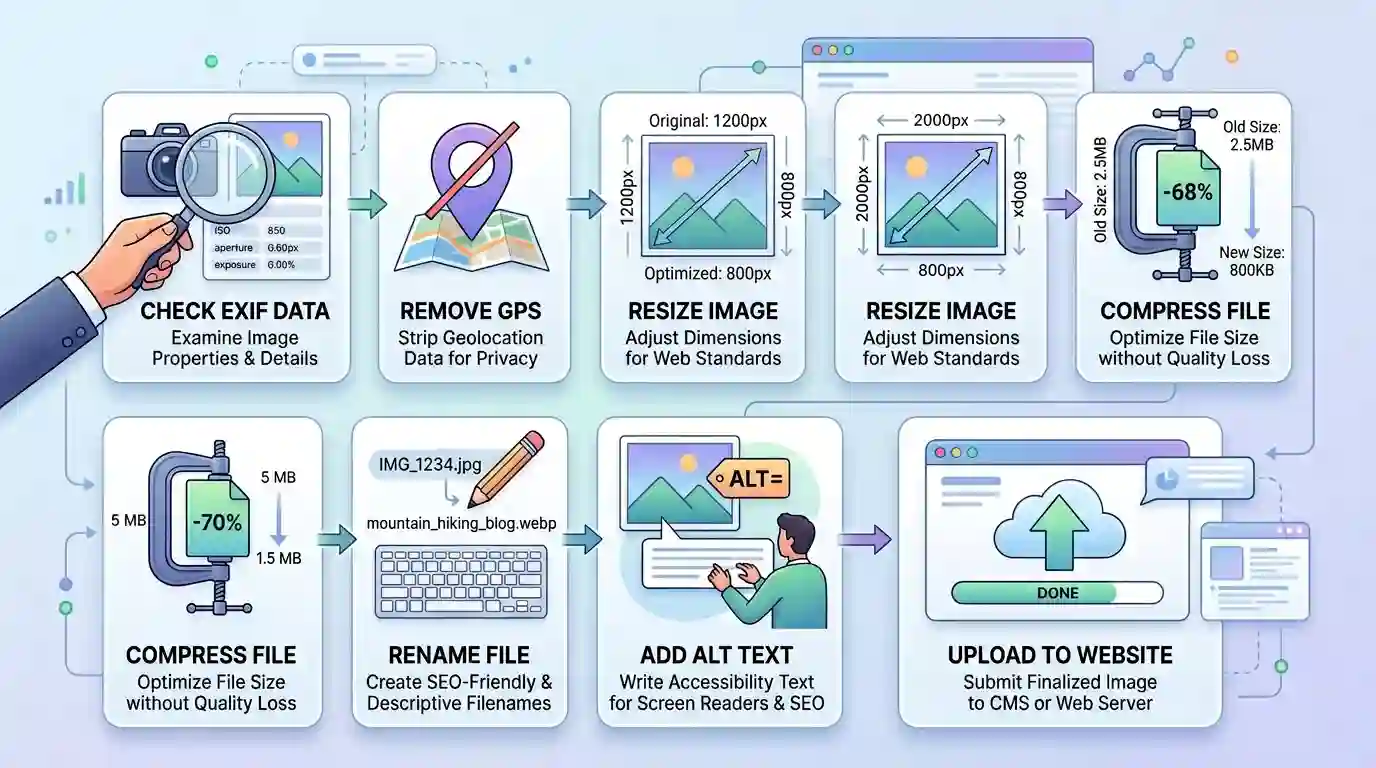
Managing EXIF data does not have to be complicated. A simple checklist can help you prepare images safely and professionally.
1. Check EXIF Before Uploading
Before uploading images to a website, check what metadata is inside. Use an EXIF viewer, image properties tool, or optimization tool to inspect the file.
Look for:
- GPS location
- Camera model
- Date and time
- Embedded thumbnail
- Software history
- Copyright fields
- Orientation data
2. Remove GPS Data From Public Images
GPS data is one of the most sensitive metadata fields. Unless the location is meant to be public, remove geotags before publishing.
This is especially important for personal blogs, family websites, private business projects, and client images.
3. Keep Useful Copyright Information
If you are a photographer, designer, or creator, you may want to keep copyright and creator information. This can support attribution and professional asset management.
However, remember that metadata can be stripped by platforms, so copyright protection should not depend only on EXIF fields.
4. Resize Images Before Uploading
Many website owners upload images directly from cameras or phones. These images can be much larger than needed. A phone photo may be thousands of pixels wide, while the website only displays it at 800 or 1200 pixels.
Resize images before uploading to reduce file size and improve speed.
5. Compress Images Without Over-Compressing
Compression helps reduce file size, but too much compression can make images blurry, noisy, or pixelated. Use a balanced approach.
The goal is to keep images visually clear while reducing unnecessary file weight.
6. Use SEO-Friendly File Names
Rename images before uploading. Instead of IMG_9271.jpg, use a descriptive file name such as exif-data-image-metadata-example.jpg.
This helps search engines and users understand the image context.
7. Add Descriptive Alt Text
Alt text helps accessibility and SEO. It should describe the image naturally. Do not stuff keywords. Use clear language that explains what the image shows.
Example:
Good alt text: “Example of EXIF metadata showing camera settings and GPS information.”
Poor alt text: “EXIF data EXIF image metadata image SEO EXIF data tool.”
8. Use the Right Image Format
For web publishing, common image formats include JPEG, PNG, WebP, and SVG. JPEG is common for photos, PNG is useful for graphics with transparency, WebP can offer strong compression, and SVG is useful for simple vector graphics.
The best format depends on the image type and the website’s needs.
9. Test Page Speed
After uploading images, test your page speed. If images are slowing down the page, optimize them further.
Image speed issues may come from large dimensions, heavy compression settings, missing lazy loading, or unremoved metadata.
Conclusion
EXIF data is hidden information stored inside many digital images. It can include camera settings, device details, date, time, orientation, GPS location, editing software, and other technical metadata. This information can be helpful for photographers, creators, editors, and businesses that need to organize or understand image files.
At the same time, EXIF data can affect privacy, file size, image optimization, and website performance. It usually does not change visible image quality, but it can add unnecessary data to files and may reveal sensitive information if not checked before publishing.
For most blogs, business websites, ecommerce stores, and public uploads, the best approach is to review images before publishing, remove sensitive metadata, optimize file size, keep useful copyright details when needed, and use proper image SEO practices. A clean image is not only safer but also better for speed, usability, and professional presentation.
FAQs
1. What is EXIF data in images?
EXIF data is hidden metadata stored inside many image files. It can include camera settings, date, time, GPS location, device model, lens details, orientation, and editing software information.
2. Does EXIF data affect image quality?
No, EXIF data does not usually affect visible image quality. Removing EXIF metadata does not reduce sharpness, resolution, or color quality if done properly.
3. Can EXIF data increase image file size?
Yes, EXIF data can slightly increase image file size. The increase may be small in one image, but it can add up across many website images.
4. Is EXIF data bad for SEO?
EXIF data is not directly bad for SEO, but unnecessary metadata can add file weight. Image SEO depends more on file size, alt text, file name, page relevance, loading speed, and user experience.
5. Should I remove EXIF data before uploading images online?
In many cases, yes. You should remove sensitive EXIF data such as GPS location, private timestamps, and device details before uploading images publicly.
6. Can EXIF data reveal my location?
Yes, if GPS metadata is stored in the image, EXIF data can reveal where the photo was taken. This is why location metadata should be removed from private or public images when not needed.
7. Do social media platforms remove EXIF data?
Many social media platforms remove some metadata from uploaded images, but you should not rely on every platform to remove all sensitive information. It is safer to check images yourself first.
8. Why do photographers use EXIF data?
Photographers use EXIF data to review camera settings such as ISO, aperture, shutter speed, focal length, exposure, and lens details. This helps them learn, organize, and improve their photography.
9. What is the difference between EXIF and alt text?
EXIF data is hidden metadata stored inside the image file. Alt text is visible to search engines and screen readers through the webpage code. Alt text is more important for accessibility and image SEO.
10. Can EXIF data be edited?
Yes, EXIF data can be edited or removed using image editing software, metadata tools, or image optimization tools. You can remove sensitive fields while keeping useful information if needed.